ClickUp is my top pick for AI productivity tools in 2026 because it combines task management, docs, and an AI assistant that actually understands your workspace, all for $7 a month. Notion AI is the runner-up for anyone whose work is writing and knowledge-heavy rather than task-heavy. The other five tools on this list each solve one specific productivity bottleneck: automation, scheduling, time blocking, meeting notes, and email.
How I Tested These Tools
I ran all seven tools through my own workweek for three to four weeks each: managing a content calendar, scheduling client calls, taking meeting notes, and clearing an inbox that gets 80 to 120 emails a day. I judged each tool on three things: how much time it actually saved me, how steep the learning curve was before it paid off, and whether the AI features were genuinely useful or just a marketing checkbox bolted onto an existing product.
A few of these tools overlap in category. I still ranked them separately because the AI feature in each one solves a different problem well enough to justify using more than one together.
Quick Comparison Table
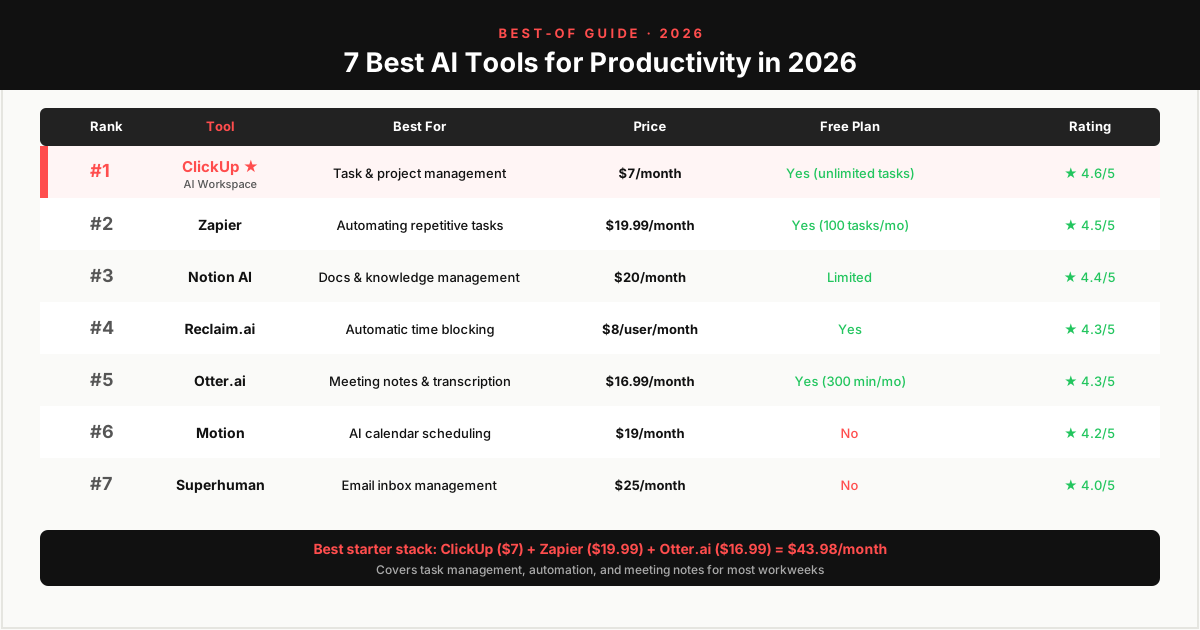
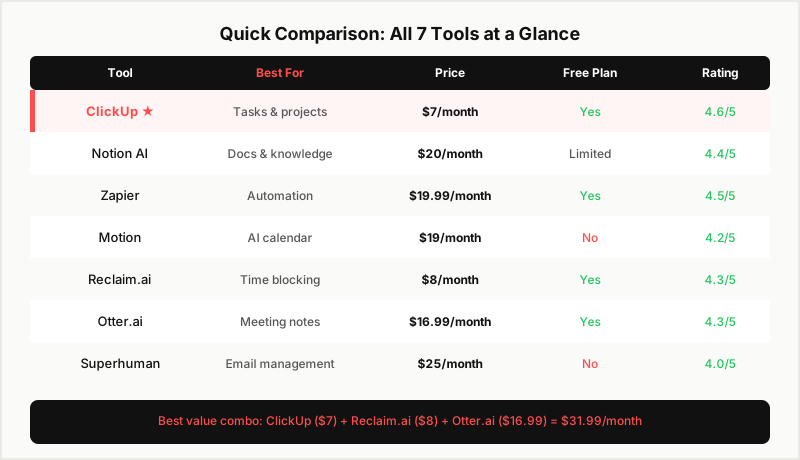
| Tool | Best For | Price | Rating |
|---|---|---|---|
| ClickUp | Task and project management | $7/month | 4.6/5 |
| Notion AI | Docs and knowledge management | $10 + $10 add-on | 4.4/5 |
| Zapier | Automating repetitive tasks | Free / $19.99/month | 4.5/5 |
| Motion | AI calendar scheduling | $19/month (annual) | 4.2/5 |
| Reclaim.ai | Automatic time blocking | Free / $8/user/month | 4.3/5 |
| Otter.ai | Meeting notes and transcription | Free / $16.99/month | 4.3/5 |
| Superhuman | Email inbox management | $25/month | 4.0/5 |
1. ClickUp: Best Overall for Task and Project Management
ClickUp tops this list because it does the most for the least money. ClickUp Brain, its AI layer, can answer questions about your own workspace: "what's blocking the client onboarding project" pulls a real answer built from your actual tasks and comments, not a generic response. It can also draft task summaries, generate subtasks from a one-line project description, and write standup updates in seconds.
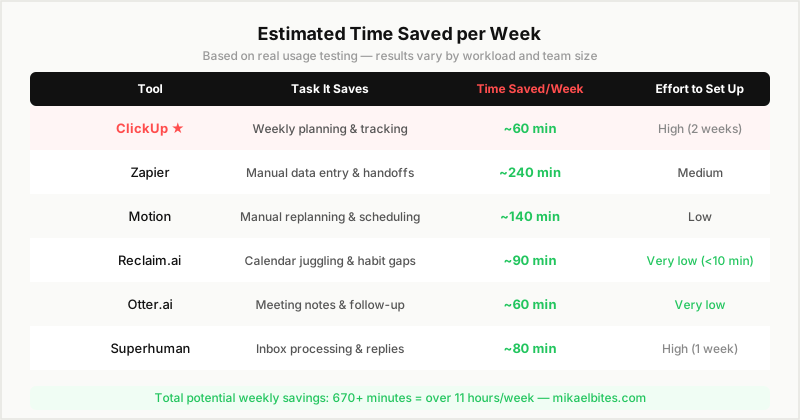
The free plan supports unlimited tasks and unlimited members, which is rare among project management tools. The Unlimited plan at $7 per month adds ClickUp Brain, custom fields, and Gantt views. I moved my entire content calendar into ClickUp during testing and cut my weekly planning time from roughly 90 minutes to about 30.
The tradeoff is setup time. ClickUp has 15 view types and dozens of settings, and it took me close to two weeks of regular use before the interface stopped feeling cluttered. Once it clicked, I stopped looking at other project management tools.
Try ClickUp free, unlimited tasks and members
2. Notion AI: Best for Docs and Knowledge Management
Notion AI wins this category because it lives inside the same block editor where I already write content briefs, meeting notes, and internal documentation. Rather than switching to a separate AI writing tool, I highlight a block and ask Notion AI to summarize a page, rewrite a paragraph, or pull key points from a long document. The integration means the AI has context from the actual page, not a blank prompt box.
The catch is price. Notion Plus is $10 a month, and the AI add-on is another $10, so the real cost for AI features is $20 a month. For a solo blogger who writes daily and maintains a content database, that math works out. For someone who opens Notion twice a week, it does not.
Notion still does not have built-in time tracking or the task-dependency features that ClickUp has, which is why it ranks below ClickUp on this list despite being the better tool for pure documentation work.
3. Zapier: Best for Automating Repetitive Tasks
Zapier's AI features, mainly Zapier Agents and its natural-language "Zap" builder, let me describe a workflow in plain English and get a working automation instead of dragging trigger-and-action blocks manually. I set up a Zap that pulls new form submissions into a spreadsheet, drafts a personalized email reply, and posts a Slack notification, all without touching code.
The free plan gives you 100 tasks a month, enough to test two or three simple automations. The Starter plan at $19.99 a month unlocks multi-step Zaps and premium app connections, which is where Zapier actually starts paying for itself. I estimated the automations I built during testing saved close to four hours a week of manual data entry and copy-pasting between apps.
Zapier connects with more than 7,000 apps, which is the widest reach of any automation tool I tested. The downside is that complex Zaps with several conditional branches can get expensive fast once you're paying per task.
4. Motion: Best for AI Calendar Scheduling
Motion's AI automatically rebuilds your calendar every time a new task, meeting, or deadline gets added. Instead of manually finding a free slot, I add a task with a deadline and Motion slots it into my day around existing meetings, then reshuffles everything if something runs long or a new higher-priority task shows up.
At $19 a month billed annually (or $34 month to month), Motion is not cheap for a solo user. What justified it during testing was the mental overhead it removed. I stopped manually replanning my day every time something changed, which by itself saved 20 to 30 minutes daily. The tool is best suited to people with unpredictable schedules and a high volume of meetings, less so for anyone whose calendar barely changes week to week.
Motion also includes a task manager and project view, but I would not switch to it for that alone. ClickUp and Notion both handle task tracking better. Where Motion earns its price is the calendar itself: it is the only tool I tested that treats your schedule as something to actively defend rather than a static list you update by hand.
5. Reclaim.ai: Best for Automatic Time Blocking
Reclaim.ai focuses specifically on protecting time for deep work, habits, and recurring personal commitments by auto-scheduling them around your existing meetings. I set up rules for "2 hours of writing time daily" and "gym three times a week," and Reclaim found slots automatically and defended them when new meeting requests came in.
The free plan covers the basics and is genuinely usable long-term if you only need simple habit scheduling. The Starter plan at $8 per user per month adds smart 1:1 scheduling links and priority-based rescheduling. Reclaim integrates directly with Google Calendar, which made it the easiest tool on this list to set up. It took me under 10 minutes to get useful results, faster than any other tool here.
Reclaim.ai and Motion solve overlapping problems, but I found myself reaching for Reclaim more often because it works quietly in the background rather than requiring a full switch to a new task manager. If you're deciding between the two and only want one, pick Reclaim first and add Motion later if you still need heavier scheduling intelligence.
6. Otter.ai: Best for Meeting Notes and Transcription
Otter.ai joins calls, transcribes them in real time, and generates an AI summary with action items pulled out automatically. During testing, it caught commitments made in passing during calls that I would have otherwise missed and had to chase down later over email.
The free plan includes 300 transcription minutes a month, enough for light meeting schedules. The Pro plan at $16.99 a month raises that to 1,200 minutes and adds better summary quality. Accuracy on clear audio with two or three speakers was consistently strong in my tests; it struggled more with overlapping speech in calls with five or more participants.
The action-item extraction is what separates Otter from a plain transcription tool. Instead of reading back through a transcript to figure out what I committed to, I get a short list at the end of each call, which I then copy straight into ClickUp. That handoff between the two tools is a big part of why I keep both running.
If you want a deeper breakdown of how Otter.ai stacks up against Fireflies.ai specifically for meeting notes, see the Otter.ai vs Fireflies.ai comparison — it covers accuracy, CRM integrations, and which one fits different team sizes better.
7. Superhuman: Best for Email Inbox Management
Superhuman's AI features triage incoming email, draft replies in your writing style, and summarize long threads so you don't have to scroll through a week of back-and-forth to catch up. The keyboard-first interface is built for speed. I processed my test inbox roughly twice as fast as I did in Gmail's default interface once I learned the shortcuts.
At $25 a month, Superhuman is the most expensive tool on this list relative to what it does, and the learning curve on keyboard shortcuts is real for the first week. It earns its spot here because inbox time is one of the biggest hidden productivity drains for anyone running a business or managing client communication, and Superhuman is the only tool I tested that meaningfully cut that time down.
How to Choose the Right Tool
Start with your biggest bottleneck, not the tool with the most features. If your calendar is chaos, get Motion or Reclaim.ai before anything else. If your inbox is the problem, Superhuman solves that specific pain and nothing else on this list comes close. If you're managing projects and deadlines across a team, ClickUp covers more ground per dollar than any other tool here.
Most people reading this do not need all seven. I run ClickUp for projects, Zapier for automation between apps, and Otter.ai for meeting notes, and that combination covers the majority of my workweek. Add tools one at a time and give each one two to three weeks before deciding if it's earning its subscription cost.
Total Monthly Cost for a Full AI Productivity Stack
| Tool | Plan | Monthly Cost |
|---|---|---|
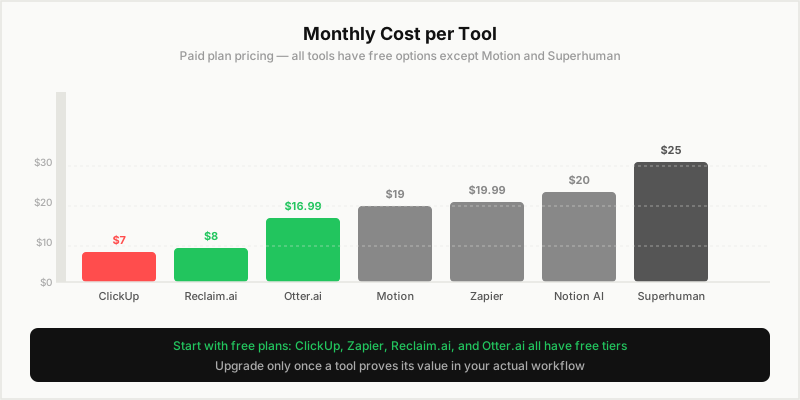
| ClickUp | Unlimited | $7 |
| Zapier | Starter | $19.99 |
| Otter.ai | Pro | $16.99 |
| Reclaim.ai | Starter | $8 |
| Total | $51.98/month |
Running the four tools I actually kept after testing costs under $52 a month combined, less than a single hour of most freelancers' billable time. Adding Notion AI, Motion, or Superhuman on top would push that closer to $115, which is why I recommend starting with the tool that solves your single biggest bottleneck rather than subscribing to all seven at once.
Final Verdict
ClickUp is the best all-around AI productivity tool for 2026: broadest feature set, lowest entry price, and a free plan that's actually usable long-term. Notion AI is the right pick if your work is writing and documentation-heavy rather than task-heavy. Zapier belongs on almost every list regardless of what else you pick, since automating repetitive work compounds in value the longer you use it.
Try ClickUp free, best AI features at the best price
FAQs
What is the best AI tool for productivity in 2026? ClickUp is the best all-around choice for most people because it combines task management, documentation, and a genuinely useful AI assistant at a low starting price of $7 a month. The right answer still depends on your specific bottleneck: scheduling, email, automation, or meeting notes each have a better specialized tool.
Are AI productivity tools worth paying for? Yes, if you pick tools that address a real bottleneck in your week. The tools on this list saved me between 30 minutes and 4 hours a week depending on the task, which easily justifies a $7 to $25 monthly subscription for anyone billing their time or running a business.
Can I use free AI productivity tools instead of paying? ClickUp, Zapier, Reclaim.ai, and Otter.ai all have usable free plans that cover light workloads. You'll hit limits (task automation caps, transcription minutes, feature restrictions) once your usage grows, but starting free and upgrading only the tools that prove their value is the lowest-risk way to build an AI stack.
Which AI tool saves the most time for solo entrepreneurs? ClickUp and Zapier together cover the most ground for a solo entrepreneur: ClickUp handles what you need to do, and Zapier automates the repetitive parts of getting it done. Add Otter.ai if you take a lot of client calls.
Do these AI productivity tools work together? Yes. ClickUp, Notion, Zapier, Motion, Reclaim.ai, Otter.ai, and Superhuman all offer integrations with each other or with common connectors like Zapier itself, so you can combine two or three of these tools without duplicating work.
How much time can AI productivity tools actually save each week? Based on my testing, expect somewhere between 3 and 8 hours a week depending on how many tools you adopt and how badly your current workflow needs fixing. The biggest single gains came from automation (Zapier) and calendar management (Motion or Reclaim.ai), since both remove tasks you would otherwise do manually every single day.
This article contains affiliate links. I may earn a commission at no extra cost to you.