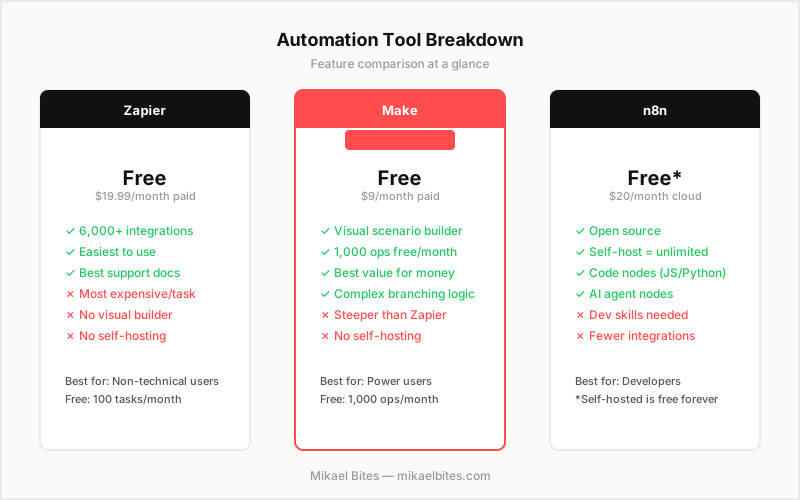
Make is the best pick for most bloggers and content teams who want visual workflows at a price that is easy to justify. Zapier wins on simplicity and integration count but costs significantly more per task at scale. n8n is the right choice for developers who want full control, self-hosting, and no per-execution limits. If you are not a developer and have never used automation tools before, start with Make's free plan.
Quick Comparison Table
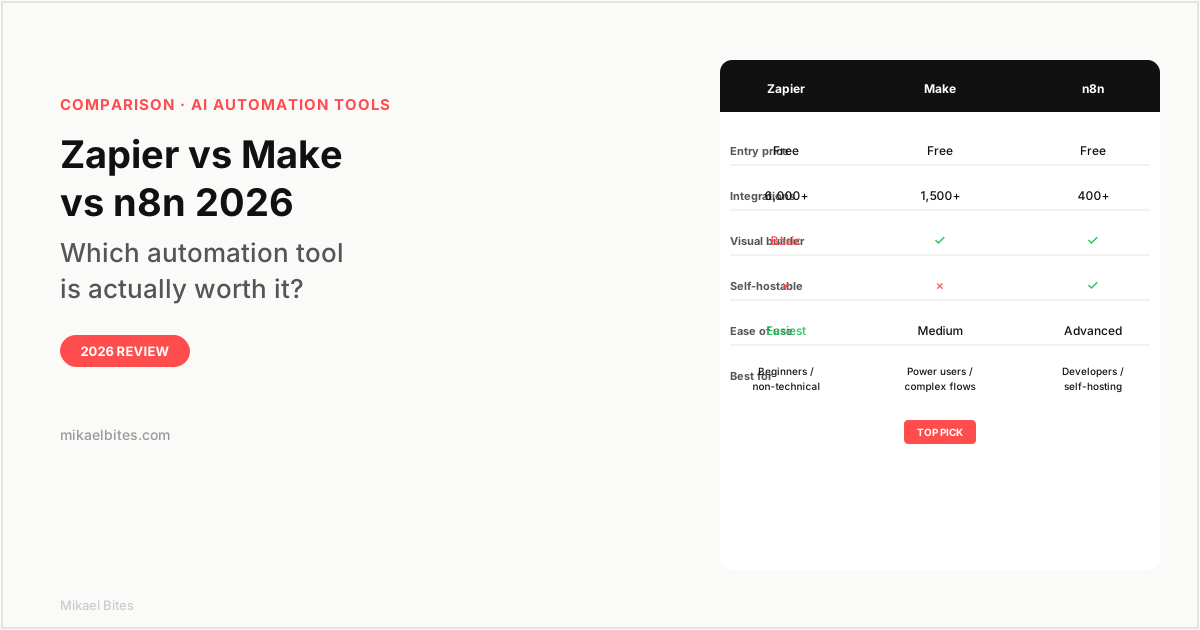
| Feature | Zapier | Make | n8n |
|---|---|---|---|
| Starting price | Free (100 tasks/month) | Free (1,000 ops/month) | Free (self-hosted) |
| Paid entry | $19.99/month | $9/month | $20/month (cloud) |
| Integrations | 6,000+ | 1,500+ | 400+ |
| Visual workflow builder | Basic | Full canvas | Full canvas |
| Self-hostable | No | No | Yes |
| AI/code nodes | Limited | Yes | Yes (JS + Python) |
| Best for | Beginners | Power users | Developers |
Overview: Zapier
Zapier is the oldest and most well-known tool in this space. It connects over 6,000 apps, which is more than Make and n8n combined. If the two tools you want to connect are niche, Zapier probably supports them when the others do not.
The product works on a "Zap" model: a trigger in one app kicks off one or more actions in another. Setting up a basic Zap takes a few minutes and requires no technical knowledge. That simplicity is Zapier's core selling point, and it genuinely delivers. I set up a workflow connecting a Google Form to Slack to Airtable in under ten minutes with zero prior experience in the tool.
Where Zapier struggles is cost. The free plan gives you 100 tasks per month, which runs out quickly once your workflows are doing real work. The first paid tier is $19.99 per month for 750 tasks. Make's free plan gives you 1,000 operations per month, and the first paid tier is $9 per month for 10,000 operations. For comparable volume, Make costs roughly half what Zapier does.
Zapier also lacks a proper visual workflow canvas. You build Zaps in a step-by-step list interface, which is fine for simple linear workflows but becomes awkward for anything with conditional branching. If your workflow has logic like "if X then do this, else do that," you are working around the interface rather than with it.
Try Zapier free, 100 tasks per month
Overview: Make
Make (previously called Integromat before a rebrand in 2022) has the best visual workflow builder of the three. You build "scenarios" on a canvas where modules connect to each other with lines, and the flow is immediately visible. For anyone who thinks better when they can see the structure of a process, Make's interface makes complex automation genuinely manageable.
The free plan is better than Zapier's: 1,000 operations per month versus Zapier's 100 tasks. The paid entry tier at $9 per month gives you 10,000 operations, which covers most small-to-medium automation needs. For content teams running workflows around publishing, social scheduling, or lead handling, Make's pricing makes sense from day one.
Make supports complex logic natively. You can build workflows with multiple branches, error handling, iterators, and aggregators — things that require workarounds in Zapier. The router module lets you send data down different paths based on conditions, which is essential for workflows that are not purely linear.
One limitation: Make does not support self-hosting. Like Zapier, it is a SaaS product. Your automation data passes through Make's servers, which matters if you are handling sensitive customer data and have compliance requirements.
Try Make free, 1,000 operations per month
Overview: n8n
n8n is the developer-first option in this comparison. It is open source, self-hostable, and has a node-based visual editor that includes native JavaScript and Python code nodes. If you want to write custom logic in a workflow without duct-taping together workarounds, n8n handles it natively.
The self-hosting option is what makes n8n financially interesting. Running n8n on your own server (a $5 per month VPS works fine for most personal or small-team use) means no per-execution costs, no usage limits, and no SaaS subscription. For high-volume automation, this calculus changes significantly compared to Zapier or Make.
The cloud-hosted version starts at $20 per month for 2,500 executions. That is more expensive than Make's cloud pricing for similar volume, so the cloud option only makes sense if you specifically need n8n's AI agent capabilities or code nodes without the infrastructure overhead of self-hosting.
n8n has been adding AI agent features aggressively and is now one of the better tools for building AI workflows that chain multiple LLM calls with tool use. If you want to automate something like "check my inbox, summarize each email with AI, route based on category, and post to Slack," n8n handles this more cleanly than Zapier or Make.
The learning curve is real. I would not recommend n8n as a first automation tool for someone with no technical background. The interface is powerful but assumes you know what a webhook is and can debug a failing node by reading its output JSON.
Features Head-to-Head
Ease of Use
Zapier wins by a clear margin. The step-by-step Zap builder with auto-suggestions is the most accessible automation interface available. Most non-technical users can build their first Zap in under fifteen minutes.
Make has a moderate learning curve. The canvas is intuitive once you understand the concept, but the first session is disorienting. Give it an hour and it clicks.
n8n is the most complex. It rewards investment — once you know it, it is faster and more powerful than the others — but the initial setup and debugging experience is not beginner-friendly.
Integration Library
Zapier has 6,000-plus app integrations, far ahead of the others. For mainstream tools (Gmail, Slack, Google Sheets, HubSpot, Salesforce), all three cover them. Where Zapier's library matters is the long tail: smaller SaaS apps, regional tools, and niche platforms that Make and n8n have not built connectors for yet.
If your workflow uses only common apps, the integration gap between the three tools is largely irrelevant. If you need to connect something specific and obscure, check Zapier first.
Pricing at Scale
For high-volume automation, the cost difference between tools becomes significant.
At 10,000 tasks per month: Zapier Professional costs $49 per month, Make Core costs $9 per month, and self-hosted n8n is free. That is a large gap. For automation-heavy workflows — bulk social posting, high-frequency monitoring, large-scale lead handling — Make or n8n win purely on economics.
AI and Advanced Automation
n8n leads here. Its AI agent nodes let you build LLM-powered workflows with access to tools, memory, and multi-step reasoning. Make has added some AI capabilities but they feel bolted on. Zapier's AI features are basic and mostly limited to using OpenAI in individual steps rather than building intelligent agent flows.
Pricing Comparison
| Plan | Zapier | Make | n8n |
|---|---|---|---|
| Free | 100 tasks/month | 1,000 ops/month | Self-hosted free |
| Entry paid | $19.99/month (750 tasks) | $9/month (10,000 ops) | $20/month (2,500 runs) |
| Mid tier | $49/month (2,000 tasks) | $16/month (10,000 ops, priority) | $50/month (10,000 runs) |
| Team | $69/month | $29/month | Custom |
The pricing gap between Zapier and Make at every tier is the most important number on this table for most readers. If you need fewer than 10,000 operations per month, Make's $9 plan covers it. Zapier's equivalent tier is $49 per month.
Which Is Better for Bloggers and Content Teams?
Make. The visual builder is practical for the workflows content teams actually run: scheduling social posts, routing form submissions, syncing content calendars, triggering email sequences. The $9 per month paid plan is easy to justify once your workflows are saving you an hour a week.
Zapier makes sense if you need a specific integration that Make does not support, or if you have team members who are genuinely intimidated by any interface more complex than a checklist.
Which Is Better for Developers?
n8n, clearly. Self-hosting removes cost constraints, code nodes remove logic constraints, and the AI agent capabilities are more mature than either Zapier or Make.
My Verdict: Which Should You Choose?
Make is the right choice for most bloggers, marketers, and content teams. Better free tier than Zapier, visual canvas that handles complex logic, and pricing that does not penalize you for automating more.
Zapier is worth it if the specific apps you need are only on Zapier's integration list, or if onboarding a non-technical team and you need the simplest possible interface.
n8n is the right call for developers, technical founders, or anyone running high-volume automation where per-execution SaaS pricing stops making sense.
Try Make's free plan first. If you hit a wall with a missing integration, check Zapier. If you need to self-host or write custom code in your workflows, move to n8n.
Try Make free, 1,000 operations per month included
FAQs
Is Zapier better than Make? For beginners and simple workflows, yes. For price, visual workflow design, and handling complex logic, Make is better. The right answer depends on your use case and technical comfort level.
Is n8n free? n8n is free to self-host on your own server. The cloud-hosted version starts at $20 per month. Most developers use the self-hosted option on a cheap VPS to avoid recurring costs entirely.
Can Make replace Zapier? For most workflows, yes. Make supports all the major app integrations that most people need, has a better visual builder, and costs significantly less. The only gap is Zapier's long tail of 6,000-plus integrations for niche apps.
Which automation tool is best for AI workflows? n8n has the most mature AI agent capabilities among the three, with native LLM nodes, tool use, and multi-step AI reasoning. Make and Zapier have added AI features but they are less integrated.
Is Make the same as Integromat? Yes. Integromat rebranded to Make in 2022. The product is the same company and the same core platform, now with a redesigned interface and expanded features.
This article contains affiliate links. I may earn a commission at no extra cost to you.