ClickUp is the best overall choice for most bloggers, freelancers, and small teams who want a capable project management tool with solid AI features at a fair price. Notion is unmatched for documentation, knowledge management, and writing-centric workflows. Monday.com is the most polished tool for client-facing work and larger teams, but it is also the most expensive and has the weakest AI features of the three. If you are managing your content calendar and projects solo or in a small team, ClickUp gives you the most for the least money.
Quick Comparison Table
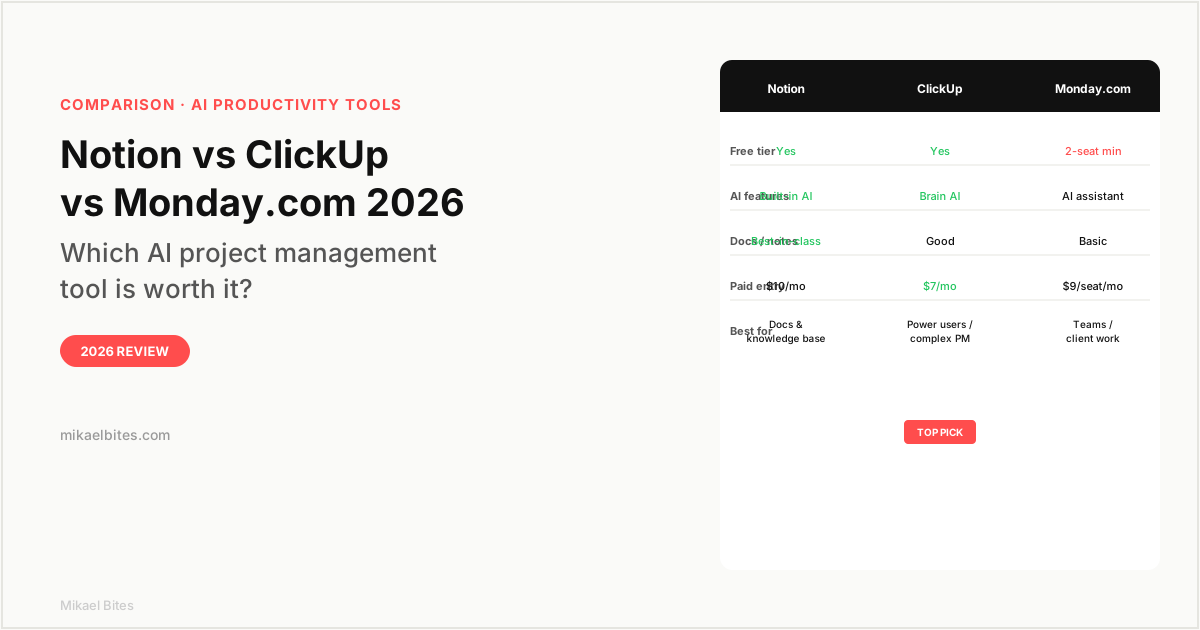
| Feature | Notion | ClickUp | Monday.com |
|---|---|---|---|
| Free tier | Yes | Yes | Trial only |
| Paid entry | $10/month | $7/month | $9/seat/month |
| AI features | Writing assistant | ClickUp Brain | Basic assistant |
| Task management | Basic | Full | Full |
| Docs / notes | Best-in-class | Good | Basic |
| Time tracking | No | Yes | Yes |
| Best for | Docs, knowledge | Power users | Teams, clients |
Overview: Notion
Notion started as a note-taking and documentation tool and has evolved into a flexible workspace that combines notes, databases, tasks, and wikis in one environment. In 2026, it remains the best tool in this comparison for writing-heavy workflows: documentation, content calendars, standard operating procedures, meeting notes, and knowledge management.
The block-based editor is the most flexible of the three tools. You can build a content database where each row is a blog post, link to a page of notes for that post, embed task checklists within the same page, and organize everything with filtered views. For a solo blogger or content team managing an editorial calendar, Notion's flexibility makes it genuinely powerful — but that flexibility requires setup investment before it pays off.
Notion AI is the writing assistant layer. It can draft text, summarize pages, translate, rewrite in a different tone, and answer questions about your workspace. The integration is clean — AI assistance lives inside the editor where you are already working, not in a separate interface. The catch: Notion AI is $10 per month on top of your plan, which makes the real cost $20 per month for Plus plan users who want AI. For that price, you should weigh whether you need a separate AI writing tool.
The limitations: Notion does not have native time tracking, which matters for freelancers billing by the hour. Task management is functional but not as powerful as ClickUp or Monday.com for complex projects with dependencies and multiple assignees. For a solo blogger, these gaps are manageable; for a team running complex projects, they are real.
Overview: ClickUp
ClickUp is the most feature-dense tool in this comparison, which is both its strength and its challenge. If there is a project management feature you want, ClickUp probably has it: Gantt charts, time tracking, workload views, goals, OKRs, sprint planning, resource management, custom automations, 15 different view types, and more. The free plan is genuinely usable with unlimited tasks and members, making it the best free tier of the three.
ClickUp Brain is the AI layer, and it is more capable than Notion AI in the project management context. It can answer questions about your tasks ("what is blocking the blog content pipeline?"), generate task summaries, write standup updates, suggest subtasks from a project description, and analyze your workload. The integration with ClickUp's task structure means the AI has real context about what your team is working on, not just access to a text editor.
For a content creator or freelancer managing multiple client projects, ClickUp's breadth is valuable. You get your editorial calendar, task management, time tracking, client deliverables, and AI assistance all in one tool at $7 per month — the lowest paid entry price in this comparison.
The main complaint about ClickUp is the UI. With so many features, the interface can feel overwhelming for new users. There are settings buried under sub-menus, and the flexibility that makes ClickUp powerful means you spend more time configuring it than you would with Notion or Monday. Give it two to three weeks of regular use before forming a strong opinion — it pays off.
Try ClickUp free, unlimited tasks and members
Overview: Monday.com
Monday.com is the most polished and professionally designed tool in this comparison. The interface is clean, the onboarding is guided, and the product feels immediately familiar to teams coming from spreadsheet-based project tracking. For client-facing work — managing agency deliverables, tracking campaigns, running client projects — Monday.com's visual presentation is a genuine advantage.
The AI features are the weakest of the three. Monday's AI assistant can generate text in documents and help with automations, but it does not have ClickUp Brain's task-aware query capability or Notion AI's clean integration with the writing environment. For a tool at this price point, the AI layer feels like a feature that was added to match competitors rather than one that was designed to solve a specific problem.
Monday.com does not have a real free plan. The trial gives you access to all features, but paying customers need a minimum of two seats. At $9 per seat per month on the Basic plan, a two-person team pays $18 per month minimum. For a solo user, Notion or ClickUp are clearly more cost-effective.
Where Monday.com justifies its price is teams doing client work or managing complex multi-department projects. The CRM boards, marketing campaign boards, and client portal features are well-executed and built for that use case in a way that ClickUp and Notion require more setup to replicate.
Features Head-to-Head
AI Capabilities
ClickUp wins for task management AI. ClickUp Brain's ability to query across your workspace and answer questions about specific projects, blockers, and workloads is more useful than Monday's basic assistant. Notion AI wins for writing and documentation use cases — editing copy, summarizing pages, drafting content in context. Monday's AI trails both.
Documentation and Notes
Notion wins clearly. The block editor and flexible database system make Notion the most capable tool for building and maintaining a knowledge base, content calendar, or documentation library. ClickUp's Docs are solid for basic team documentation. Monday's documents are basic.
Task Management
ClickUp wins on features. The range of views, automation capabilities, and project tracking depth exceed the other two. Monday.com has a better out-of-the-box experience for teams new to structured project management. Notion is weakest for heavy task management.
Pricing
ClickUp wins at every tier. The free plan is the most functional. The Unlimited plan at $7 per month offers more features than Notion Plus at $10 per month or Monday Basic at $9 per seat.
Pricing Comparison
| Plan | Notion | ClickUp | Monday.com |
|---|---|---|---|
| Free | Unlimited pages, limited blocks | Unlimited tasks, 100MB storage | Trial only |
| Entry paid | $10/month (Plus) | $7/month (Unlimited) | $9/seat/month (Basic, min 2) |
| Business | $15/month | $12/month | $12/seat/month |
| AI add-on | +$10/month | Included in Unlimited+ | Included |
Which Is Best for Bloggers and Content Creators?
For a solo blogger or content creator, ClickUp. The Unlimited plan at $7 per month gives you task management, time tracking, ClickUp Brain AI, and unlimited storage without the $10 AI surcharge that Notion charges. The content calendar views — board, list, calendar, Gantt — cover every way you might want to visualize your publishing schedule.
Notion is the right choice if your primary need is documentation and writing rather than project tracking. Many content creators use both: Notion for their content briefs, SOPs, and reference documents, and ClickUp for tracking tasks and deadlines.
Monday.com is worth it for teams doing client work or managing campaigns for multiple clients. If you are solo, the minimum two-seat pricing and weaker AI make it hard to justify over the alternatives.
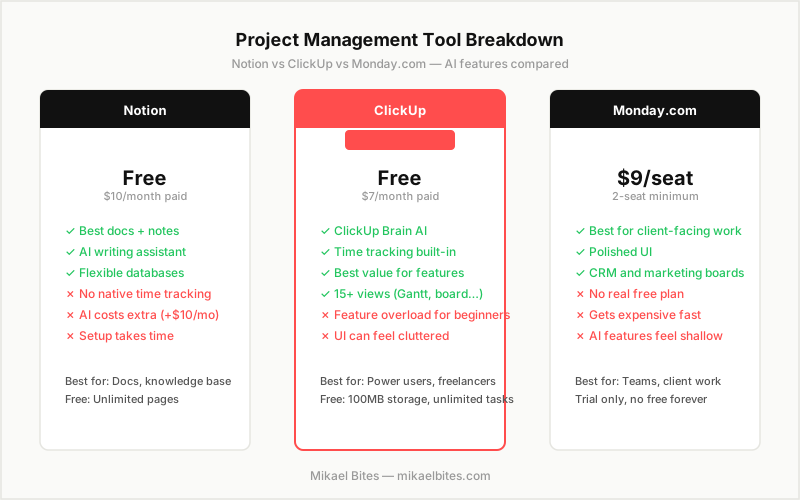
My Verdict: Which Should You Choose?
ClickUp is the best overall choice for most people reading this. The free plan is the most functional in this comparison, the AI features are well-integrated, and the paid entry price is the lowest. The learning curve is real but worth it.
Notion is the right choice if your workflow is documentation-heavy and you do most of your thinking and writing in a linked knowledge base. The AI writing assistant is best-in-class for text editing. Be ready to pay $20 per month for Plus plus AI.
Monday.com is the right choice for agencies and teams managing client projects where visual presentation and structured collaboration matter. Not the right choice for solo bloggers or anyone price-sensitive.
Try ClickUp free, best AI features at the best price
FAQs
Is ClickUp better than Notion in 2026? For project management and task tracking, yes. For documentation, knowledge management, and writing workflows, Notion is better. Many teams use both. If you can only pick one, choose based on whether your primary need is task management (ClickUp) or docs and notes (Notion).
Does Monday.com have a free plan? Monday.com does not have a permanent free plan. They offer a free trial, but paid plans require a minimum of two seats. For solo users or budget-conscious teams, Notion or ClickUp's genuine free tiers are better starting points.
Is Notion AI worth the extra cost? If you are already using Notion Plus and write or edit content regularly, yes. The $10 per month add-on for AI integrates cleanly into the editor and is more useful in a documentation context than comparable add-ons in other tools. If you do not write in Notion regularly, it is not worth it.
What is ClickUp Brain? ClickUp Brain is ClickUp's AI assistant that can answer questions about your workspace, generate text, write task summaries, and suggest actions based on your project structure. It is included in the Unlimited plan ($7/month) and above, making it the most accessible AI project management feature in this comparison.
Which is best for managing a content calendar? ClickUp or Notion. ClickUp offers more view types (calendar, board, Gantt, list) for visualizing a content schedule and has better task tracking for managing writing deadlines. Notion is better for building a linked content database where each post has associated notes, keywords, and briefs. Many content teams use Notion for the database and ClickUp for the task workflow.
This article contains affiliate links. I may earn a commission at no extra cost to you.