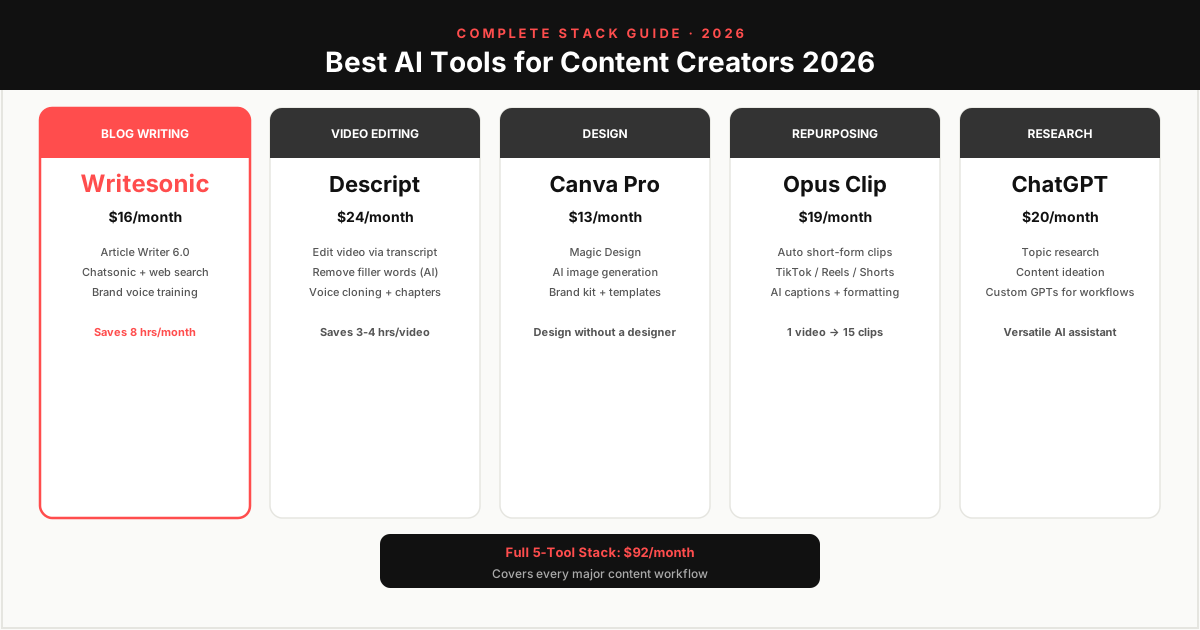
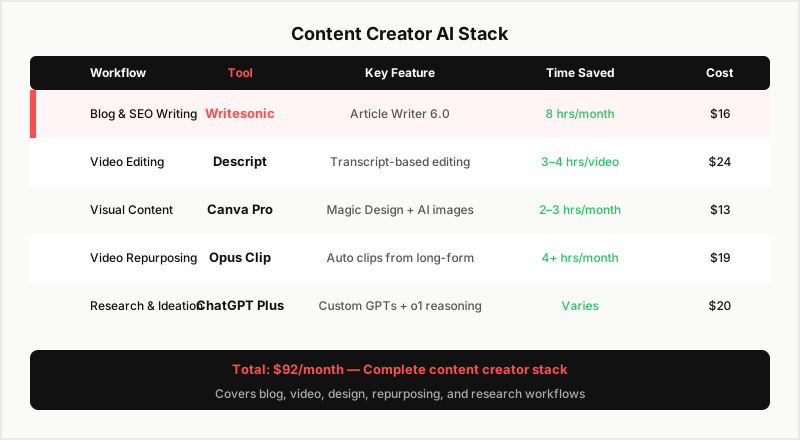
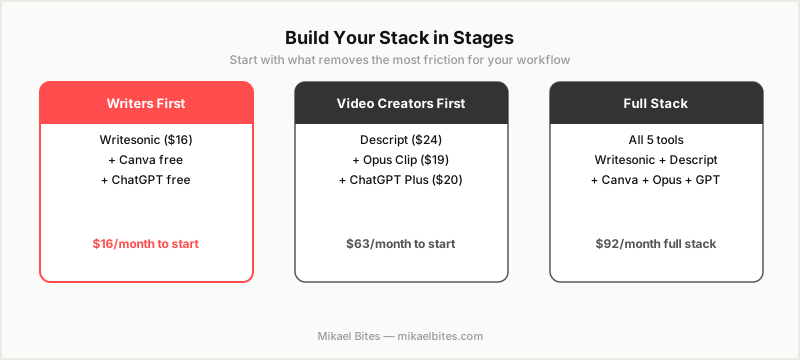
The best content creator AI stack in 2026 is Writesonic (blog writing), Descript (video editing and transcription), Canva (design), Opus Clip (video repurposing), and ChatGPT (research and ideation). Together these five tools cover every major content production workflow for a solo creator or small team at under $100 per month total.
The Content Creator's AI Productivity Challenge
The problem for most content creators is not a shortage of ideas — it is time. Writing a long-form article, editing a YouTube video, creating social graphics, and repurposing content across platforms takes more hours than most solo creators have available. AI tools in 2026 have meaningfully changed that math.
This guide covers the tools that make the most impact per dollar spent for creators who publish consistently across written, video, and social formats.
#1 Writesonic — Best for Blog and SEO Writing
Price: Free (1 article/month) | $16/month Individual
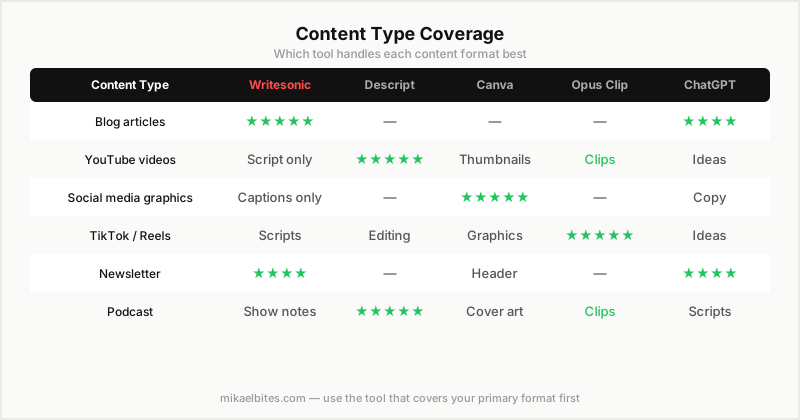
Writesonic's Article Writer 6.0 produces full SEO-optimized blog articles from a keyword or headline in under three minutes. For a content creator who also runs a blog or newsletter, this reduces article drafting from four to six hours to forty-five minutes of editing and personalizing the AI draft.
Chatsonic adds real-time web search for researching current topics, product updates, and statistics without leaving the writing platform. The brand voice training feature adapts Writesonic's output to your personal writing style after you import a few of your own articles.
Best for: Bloggers, affiliate marketers, newsletter writers ROI: A creator publishing two articles per week gains approximately eight hours per month compared to writing from scratch.
#2 Descript — Best for Video Creators
Price: Free (1 hour transcription) | $24/month Creator
Descript is the most impactful AI tool for video creators in 2026. It transcribes video automatically and lets you edit video by editing the transcript — delete a word from the transcript and the corresponding video clip is cut. For podcast editors and YouTube creators, this removes the most time-consuming part of video production.
The AI Underlord feature removes filler words (um, uh, like) with one click, generates chapters and show notes from transcripts, and creates social-ready clips with captions. Descript also has a voice cloning feature that corrects verbal mistakes without re-recording.
Best for: YouTubers, podcasters, video course creators ROI: Reduces a one-hour video edit from four to six hours to sixty to ninety minutes for most creators.
If your main use case is AI transcription for meetings and client calls rather than video editing, see the Otter.ai vs Fireflies.ai comparison for the two tools built specifically for that.
#3 Canva Pro — Best for Visual Content
Price: $13/month Pro
Canva Pro is the design tool for creators who are not designers. For YouTube thumbnails, Instagram graphics, newsletter headers, and presentation slides, Canva's AI features — Magic Design, AI image generation, Background Remover, and brand kit management — make professional-quality design accessible without hiring a designer.
The Brand Kit feature stores your logo, colors, and fonts and applies them automatically across templates. For a creator with a recognizable visual brand, Canva Pro pays for itself in one or two design projects that would otherwise require a freelance designer. For slide decks and pitches specifically, our roundup of best AI presentation makers covers Canva alongside Gamma, Beautiful.ai, and Tome.
Best for: All content creators who produce visual assets ROI: Eliminates 2–4 hours per month of design iteration vs starting from scratch.
#4 Opus Clip — Best for Repurposing Video
Price: Free (60 minutes/month) | $19/month Starter
Opus Clip takes long-form YouTube videos or podcast recordings and automatically cuts them into short-form clips optimized for TikTok, Instagram Reels, and YouTube Shorts. The AI identifies high-engagement moments, adds captions, and formats the aspect ratio for vertical video.
For a creator who produces long-form content, Opus Clip multiplies distribution without multiplying production time. A one-hour YouTube video can generate eight to fifteen Shorts and Reels in about twenty minutes of review and approval.
Best for: YouTubers, podcasters, interview hosts ROI: Enables consistent short-form publishing without a separate short-form production workflow.
#5 ChatGPT Plus — Best for Research and Ideation
Price: $20/month Plus
ChatGPT is the most flexible AI tool in a content creator's stack. For research, content ideation, headline testing, audience questions research, email drafting, and strategy conversations, ChatGPT's breadth covers everything a more specialized tool does not. The o1 model reasoning is useful for working through complex topics before writing about them.
Custom GPTs let you save recurring tasks — a "content calendar builder" GPT that generates a month of content ideas in your niche, for example — as reusable workflows you return to weekly.
Best for: Research-heavy creators, podcast hosts, newsletter writers ROI: Covers every workflow gap not addressed by specialized tools.
Full Stack Cost
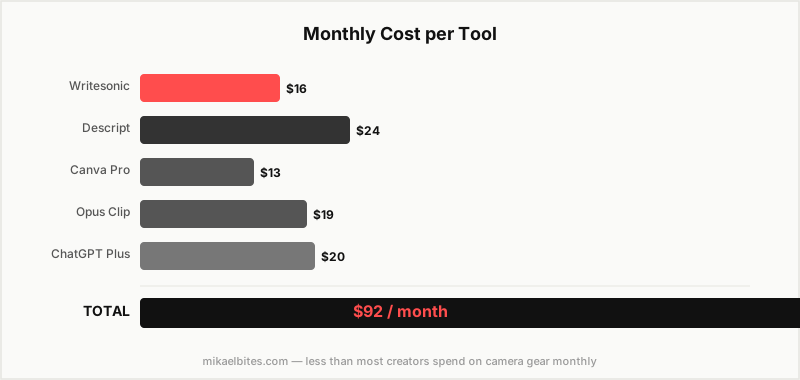
| Tool | Plan | Monthly |
|---|---|---|
| Writesonic | Individual | $16 |
| Descript | Creator | $24 |
| Canva | Pro | $13 |
| Opus Clip | Starter | $19 |
| ChatGPT | Plus | $20 |
| Total | $92/month |
FAQs
What are the best AI tools for content creators in 2026? Writesonic for blog writing, Descript for video editing, Canva for design, Opus Clip for video repurposing, and ChatGPT for research and ideation. This five-tool stack covers most content creation workflows for under $100 per month.
Which AI tool saves the most time for content creators? Descript saves the most time for video creators by reducing editing from hours to minutes. Writesonic saves the most time for bloggers and written content producers. The biggest time saver depends on which content format dominates your workflow.
Do content creators need AI tools to compete in 2026? Creators using AI tools effectively produce significantly more content per hour than those working without AI assistance. While AI tools do not replace creativity, judgment, and audience relationship, they remove enough production friction that the output gap between users and non-users has become meaningful.
This article contains affiliate links. I may earn a commission at no extra cost to you.