Descript is the best overall pick for content creators who need to record and edit video or podcast content. Its transcript-based editing workflow is genuinely transformative for post-production. Riverside is the best option for remote podcast and interview recording where you need local-quality audio from guests over the internet. Loom is best for teams doing async video communication — it is not a production tool but it is the fastest way to share a screen recording with a colleague.
Quick Comparison Table
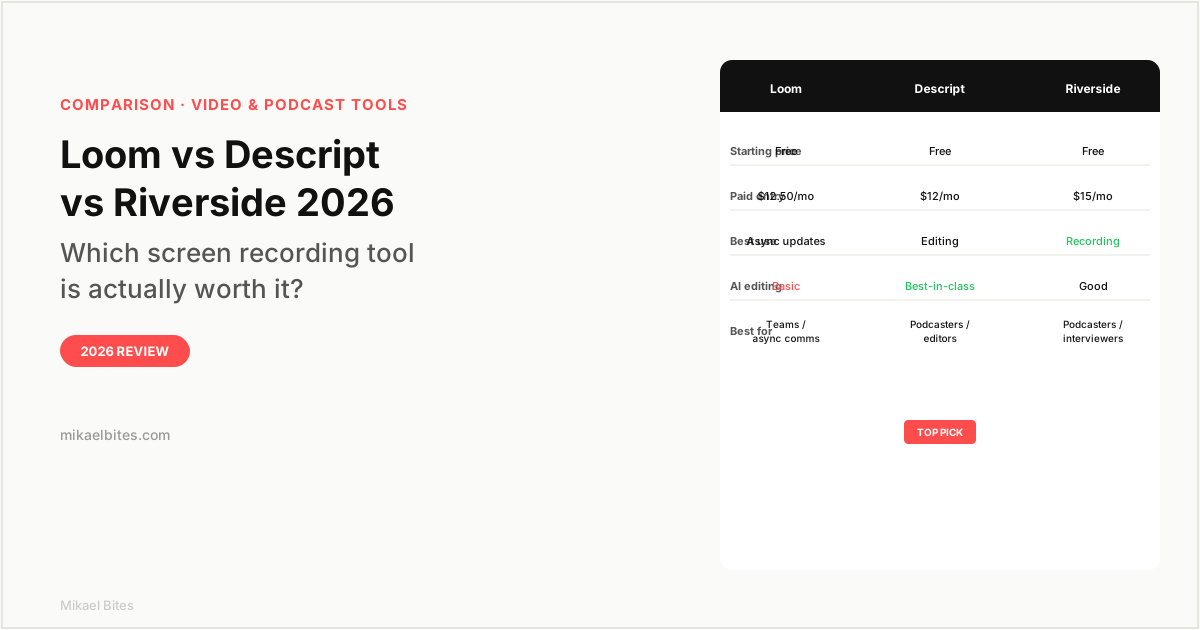
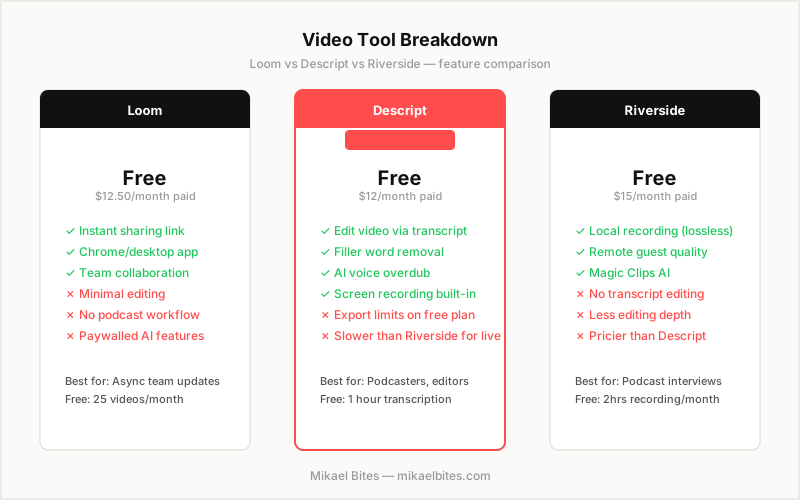
| Feature | Loom | Descript | Riverside |
|---|---|---|---|
| Starting price | Free (25 vids) | Free (1hr transcription) | Free (2hrs/month) |
| Paid entry | $12.50/month | $12/month | $15/month |
| Screen recording | Yes | Yes | Yes |
| Transcript editing | No | Yes | Basic |
| Filler word removal | No | Yes | No |
| Remote recording quality | Compressed | Good | Lossless local |
| AI clip generation | Basic | Yes | Yes |
| Best for | Async team comms | Editing/podcasting | Remote interviews |
Overview: Loom
Loom is the most focused tool in this comparison. It does one thing — record your screen and face simultaneously and share the result instantly — and it does it better than any other product in this category.
The workflow is fast: hit record in the Chrome extension or desktop app, talk through whatever you are showing, stop recording, and Loom immediately generates a shareable link. No exporting, no uploading, no rendering wait. The recipient gets a page where they can watch the video, add timestamped comments, and react with emoji. For async team communication — code reviews, feedback on a design, walking a client through a dashboard — this workflow is hard to beat.
The free plan gives you 25 videos with 5-minute maximum length. The paid Business plan at $12.50 per month removes limits, adds analytics on who watched your video and for how long, and enables team workspaces. If you are using Loom as a team communication tool at work, the business plan is likely worth it. If you are a solo content creator, you will outgrow Loom quickly because of what it lacks.
What Loom lacks: serious editing tools. You can trim the beginning and end of a video and cut out a section, but there is no transcript editing, no filler word removal, no multicam support, and no real post-production workflow. Loom is a recording and sharing tool, not a production tool. If you need to produce polished video content, you will need a different tool for editing regardless of whether you use Loom to record.
The AI features that were added in recent updates — AI summaries, auto-chapters, and basic transcription — are useful for reference but are not at Descript's level for actual editing.
Overview: Descript
Descript is the most interesting tool in this comparison because it changes the fundamental model for how video editing works. Instead of working on a timeline with clips and waveforms, you edit your video the same way you edit a text document.
Descript transcribes your recording, then lets you edit the video by editing the transcript. Delete a sentence in the transcript and the corresponding video and audio disappear. Move a paragraph and the scene reorders. Click into a word and your playhead jumps to that moment. For anyone who has ever spent time in a traditional video editor scrubbing through footage to find a specific moment, this workflow is dramatically faster.
The filler word removal is the feature that makes Descript's value proposition immediately clear. Click "remove filler words" and Descript finds every "um," "uh," "like," and "you know" in your recording and removes them in seconds. On a 20-minute recorded interview, this saves 30 to 45 minutes of manual editing work. It works well — I have used it on real recordings and it does not cut into surrounding words the way naive silence detection does.
Overdub is Descript's AI voice feature. You can train it on your own voice and then type corrections to things you said wrong — Descript generates audio in your voice for the replacement text. For fixing a mispronunciation or inserting a sentence you forgot to include, this saves a costly re-record. The quality of Overdub is good enough to be seamless in most listening contexts.
Descript also handles screen recording, so you can record, edit, and produce entirely within one tool. The free plan gives you one hour of transcription per month, which is not much for regular use. The Creator plan at $12 per month is the entry point for real work: 10 hours of transcription, watermark-free export, and full access to the AI editing features.
The limitation compared to Riverside is audio quality in remote recording sessions. When a remote guest records through Descript, their audio goes through a browser-based session rather than a local recording. The quality is good but not as clean as Riverside's local-track approach.
Overview: Riverside
Riverside is built specifically for recording podcast interviews and remote conversations at high quality. Its core technical advantage is local recording: rather than capturing the stream between you and your guest over the internet (which introduces compression and quality degradation), Riverside records each participant's audio and video locally on their own device and uploads the high-quality files after the session ends.
The result is podcast and interview recordings that sound like both participants were in the same studio, even when one guest had an unstable internet connection. The audio quality ceiling for remote recording with Riverside is significantly higher than Zoom, Google Meet, or Descript's remote session mode.
The Magic Clips feature uses AI to identify the most shareable moments in a longer recording and generates short clips from them automatically. For podcasters who want to pull quotes for social media without manual editing work, this is a genuine time saver.
What Riverside does not do well is post-production editing. Unlike Descript, there is no transcript-based editing, no filler word removal, and no Overdub-style AI voice correction. Riverside gives you clean raw files; you still need an editing tool to produce the final episode. Many podcasters use Riverside to record and Descript to edit, treating them as complementary tools in the same workflow.
The free plan gives you 2 hours of recording per month. The paid Standard plan at $15 per month is the most expensive entry point in this comparison, but if remote recording quality is your primary concern, it is worth it.
Features Head-to-Head
Recording Quality
Riverside wins for remote guest recording. The local-track approach produces audio that holds up compared to studio recording in a way that streaming-based capture does not. Descript is close for solo recording in a good acoustic environment. Loom compresses video significantly and is not suitable for production use.
Editing Capabilities
Descript wins by a large margin. Transcript editing, filler word removal, Overdub, and multicam support make it a professional editing environment. Riverside and Loom are not editing tools.
Speed of Workflow
Loom wins on speed for the share-and-send use case. Record, auto-upload, share link in under 60 seconds. Descript and Riverside are production tools with longer workflows by design.
Pricing
Descript offers the most capability for the price. At $12 per month, the Creator plan gives you transcript editing, AI features, and screen recording in one tool. Loom Business at $12.50 per month is reasonable for team use. Riverside Standard at $15 per month is the priciest entry point but justified for high-quality remote recording.
Pricing Comparison
| Plan | Loom | Descript | Riverside |
|---|---|---|---|
| Free | 25 videos, 5min max | 1hr transcription | 2hrs/month |
| Entry paid | $12.50/month | $12/month | $15/month |
| Team/Business | Custom | $24/month | $24/month |
Which Is Best for Content Creators?
Descript is the best overall choice for content creators who produce video or audio content. The transcript editing workflow, filler word removal, and Overdub are genuinely transformative for post-production efficiency. At $12 per month, the value is strong.
If you primarily record remote interviews or conversations with guests, add Riverside for the recording step and use Descript to edit. These two tools together cover a complete podcast workflow at under $30 per month.
Loom is the right choice for async communication with teams, but it is not a production tool for content creators.
My Verdict: Which Should You Choose?
Descript is the best overall choice for content creators, podcasters, and anyone who records and edits video or audio regularly. The transcript-based editing model is genuinely faster than traditional timeline editing for most content types, and the AI features justify the $12 per month price within the first few uses.
Riverside is the right choice if recording remote guests at the highest quality is your primary need. Use it alongside Descript for a complete production workflow.
Loom is right for teams using async video communication. It is not a content creation tool, but for its specific use case — record and share a screen update in under a minute — nothing beats it.
Try Loom free, 25 videos per month included
FAQs
Is Descript worth it in 2026? Yes, for podcasters and content creators who edit audio or video regularly. The transcript-based editing and filler word removal alone can save 30-60 minutes per episode compared to traditional timeline editing. At $12 per month, it is one of the better-priced production tools in this category.
Is Loom free? Yes, Loom has a free plan with 25 videos per month and a 5-minute recording limit per video. The paid Business plan at $12.50 per month removes video limits and adds team features.
What is Riverside best for? Riverside is best for recording remote podcast interviews and conversations where audio quality matters. Its local-track recording approach captures lossless audio from each participant locally, producing significantly cleaner recordings than Zoom or browser-based streaming tools.
Can Descript replace Riverside? For solo recording, yes. Descript's screen and audio recording is solid quality in a good acoustic environment. For recording remote guests at high quality, Riverside's local-track approach is meaningfully better. Many serious podcasters use both.
What is the best free tool for screen recording in 2026? Loom has the best free screen recording experience for sharing quickly — instant link, no export wait. Descript's free plan covers recording plus basic editing. Riverside's free plan is the most restrictive at 2 hours per month. For pure screen recording and sharing, Loom's free tier is the easiest starting point.
This article contains affiliate links. I may earn a commission at no extra cost to you.