Runway ML is the best overall pick for content creators and video producers who need a complete toolkit — generation plus editing in one place. Sora produces the most cinematic-quality output but has no editing tools and strict usage limits. Pika Labs is the easiest entry point, works great for short social clips, and has a free tier. If you are creating serious video content and want control, start with Runway.
Quick Comparison Table
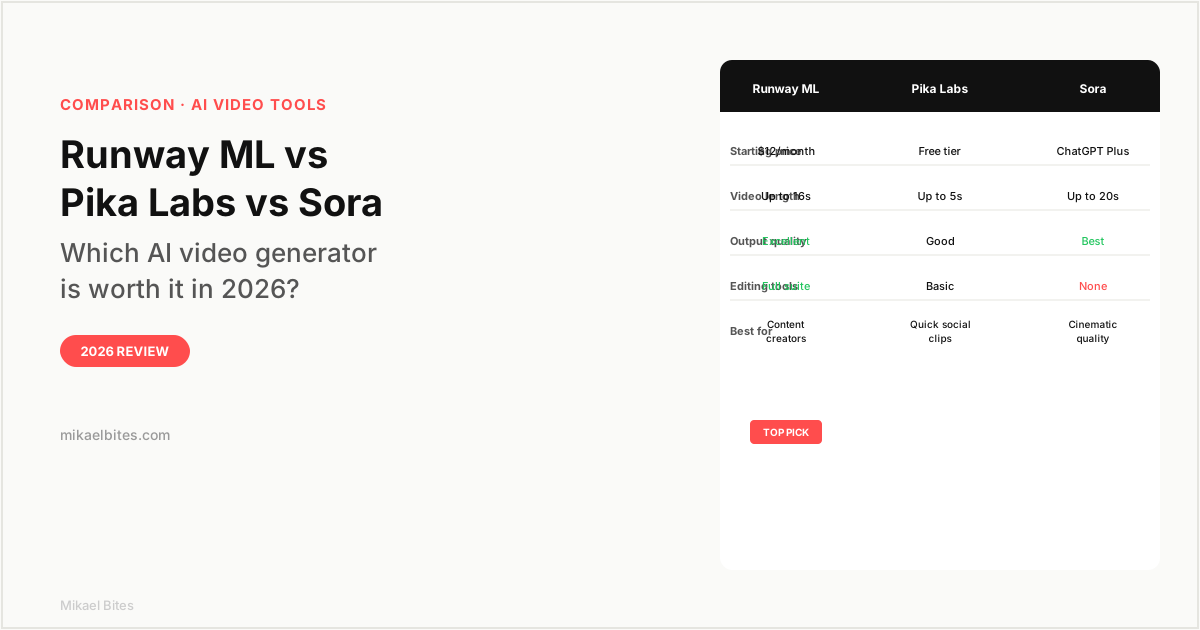
| Feature | Runway ML | Pika Labs | Sora |
|---|---|---|---|
| Starting price | $12/month | Free | ChatGPT Plus ($20/mo) |
| Max video length | 16 seconds | 5 seconds | 20 seconds |
| Output quality | Excellent | Good | Best |
| Editing tools | Full suite | Basic | None |
| Image-to-video | Yes | Yes | Yes |
| Commercial use | Yes | Yes | Limited |
| Best for | Content creators | Social clips | Cinematic quality |
Overview: Runway ML
Runway ML is the most complete AI video tool in this comparison. Where Sora generates a clip and stops, and Pika Labs gives you a quick-and-done workflow, Runway builds something closer to a full video production environment around its generation model.
The core feature is Gen-3 Alpha, Runway's current generation model. You give it a text prompt or an image, and it produces video up to 16 seconds long. The output is sharp, with good motion coherence — camera movements feel intentional rather than jittery, and subjects maintain consistent appearance across frames better than most competing models I have tested.
What separates Runway from the others is the post-generation editing layer. After your clip generates, you can use the motion brush to paint specific areas of the frame and control how they move, independently of the rest of the scene. You can expand the canvas with inpainting, use the background remover, and combine clips in the editor. For a content creator building a full video, these tools eliminate the need to jump into a separate editing application for basic refinements.
Pricing starts at $12 per month for the Standard plan, which gives you 125 credits per month. Each credit generates roughly one second of video. If you are producing a lot of short-form content, credits run out. The Pro plan at $28 per month gives you 625 credits and allows commercial use at higher resolutions.
The learning curve is steeper than Pika or Sora. Runway is not designed for casual one-prompt use; it rewards users who invest time understanding prompt structure, motion control, and the editing pipeline. That investment pays off if you are using it professionally.
Try Runway ML free, 125 credits included
Overview: Pika Labs
Pika Labs is the beginner-friendly option in this comparison, and it has built that position by making AI video generation as friction-free as possible. You type a prompt, wait about thirty seconds, and get a short clip. There is no complex pipeline, no credit system to understand, and no editing tools to learn.
The free tier is genuinely usable. You get a set number of generations per day, enough to experiment with prompts and see how the model responds. The paid plan starts at $8 per month and removes the daily limits.
Output quality is solid for social content. Clips are up to 5 seconds long, which is enough for Instagram Reels, TikTok clips, and product showcases. The model handles simple subject motion and scene changes reasonably well. Where it shows limitations is complex motion physics — a person running across a frame with realistic gait, or fluid dynamics like water — which looks noticeably synthetic compared to Runway or Sora output.
Pika added image-to-video capability that works well for bringing static product photography or illustrations to life. Upload an image, describe how you want it to move, and Pika generates a short animated version. This is one of the cleanest implementations of image-to-video in this comparison.
The 5-second clip length is the hard ceiling that matters most. For social content, it is often enough. For anything that requires a longer narrative arc — a product demonstration, a YouTube intro, or any clip over 5 seconds — you are stitching together multiple Pika generations and cutting them in an external editor. That workflow is clunky and the seams often show.
Overview: Sora
Sora is OpenAI's video generation model, available to ChatGPT Plus and Pro subscribers. It produces the most photorealistic and cinematically coherent output of the three tools in this comparison. When you want a video clip that could plausibly appear in a professional production, Sora is closest to delivering that.
The physics simulation is the standout. Sora renders realistic lighting, shadows, reflections, and physical interactions between objects better than any other model I have used. A glass on a table, a person walking down a street, a car moving through rain — these look like footage rather than AI output in a way that Runway and Pika do not yet match.
Clips run up to 20 seconds, the longest of the three. Combined with the quality ceiling, this makes Sora the strongest option for purely generative work — creating visual assets that live on their own without the need for editing or extension.
The limitations are meaningful. Sora has no editing tools. You prompt, you generate, you get a clip. If you want to adjust the motion, change an element, or composite multiple generations, you need a separate editing workflow. That is workable if you treat Sora as an asset generator rather than a production environment, but it requires a different mental model than Runway's all-in-one approach.
Usage limits for ChatGPT Plus subscribers are tighter than Runway's credit system. You can generate videos until you hit the monthly cap, which is not publicly specified but is restrictive enough that heavy users regularly hit it before the month ends. The Pro plan at $200 per month removes most limits, but that is an expensive jump for video content specifically.
Commercial licensing is also less clear than Runway or Pika. OpenAI's current terms allow sharing and publication but the scope for commercial use is narrower than Runway's explicit commercial licensing on paid plans.
Features Head-to-Head
Output Quality
Sora wins on raw quality. The photorealism, lighting accuracy, and physics simulation are ahead of the other two. For a viewer who does not know the content is AI-generated, Sora output is hardest to identify as artificial.
Runway ML is close and produces very good results, particularly on subjects with clear motion intent — camera moves, character gestures, product reveals. Pika is noticeably behind on complex scenes but holds its own on simple compositions.
Editing and Control
Runway wins clearly. Its motion brush, inpainting, background removal, and timeline editor make it a production environment, not just a generator. You can take a rough generation and refine it without leaving the tool.
Pika has basic editing features but nothing close to Runway's depth. Sora has none.
Ease of Use
Pika is the easiest by design. The interface expects nothing from you beyond a text prompt. Sora is similarly simple — you prompt through the ChatGPT interface. Runway is the most complex, with a learning curve that matches its capabilities.
Pricing at Scale
Pika wins on entry cost. The free tier is real, and the $8 per month paid plan is the cheapest in this group. Runway at $12 per month is reasonable for a professional tool. Sora is technically free within ChatGPT Plus, but ChatGPT Plus costs $20 per month and you are sharing that allocation across all ChatGPT usage.
For a content creator generating video regularly, Runway Pro at $28 per month for 625 credits is the most economically sensible professional option.
Pricing Comparison
| Plan | Runway ML | Pika Labs | Sora |
|---|---|---|---|
| Free | 125 credits (trial) | Yes, daily limit | With ChatGPT free (limited) |
| Entry paid | $12/month (125 credits) | $8/month | ChatGPT Plus ($20/month) |
| Professional | $28/month (625 credits) | $28/month | ChatGPT Pro ($200/month) |
| Commercial rights | Pro plan + | Basic plan + | Limited terms |
Which Is Better for Content Creators?
Runway ML. The combination of generation quality and the post-generation editing toolkit makes it the only one of these three that functions as a standalone video production workflow. A content creator producing YouTube Shorts, social media video, or course footage can get from idea to finished clip in one environment.
Pika is worth trying first if you are new to AI video. The free tier removes the financial barrier and the interface is fast enough to experiment with prompts until you understand how the models respond.
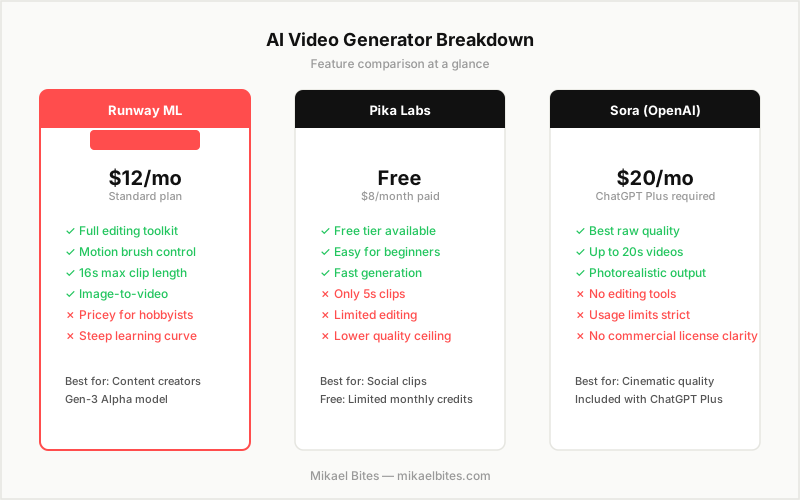
My Verdict: Which Should You Choose?
Runway ML is the best overall choice for anyone creating video content professionally or semi-professionally. The editing tools and generation quality together justify the $12 to $28 per month cost if you are producing video regularly.
Pika Labs is the best starting point for someone new to AI video who wants to see what the technology can do without spending money. The free tier is real and the simplicity is genuine.
Sora is worth using if you already pay for ChatGPT Plus and want access to the highest quality generation ceiling for occasional or experimental work. It is not the right choice as your primary video workflow because of the missing editing layer and unclear commercial rights.
Try Runway ML, best AI video generation toolkit in 2026
FAQs
Is Runway ML worth it in 2026? Yes, for content creators who produce video regularly. The combination of Gen-3 Alpha generation quality and the built-in motion brush, inpainting, and timeline editor makes it the most complete AI video production environment available. At $12 to $28 per month depending on credit needs, the cost is justified if you are producing video consistently.
Is Sora better than Runway ML? Sora produces higher raw quality output — more photorealistic, with better physics simulation. Runway ML has better editing tools and a more complete workflow. Sora is better for generating a single high-quality clip; Runway is better for producing polished video content from start to finish.
Is Pika Labs free? Yes, Pika Labs has a genuine free tier with daily generation limits. The paid plan starts at $8 per month and removes the daily cap. It is the most accessible entry point into AI video generation of the three tools in this comparison.
What is the best AI video generator in 2026? For most content creators, Runway ML is the best overall choice because of its complete toolkit. For pure generation quality, Sora is ahead. For ease of use and free access, Pika Labs wins. The best choice depends on whether you prioritize editing control, output quality, or cost.
Can I use AI-generated video commercially? Runway ML explicitly allows commercial use on paid plans. Pika Labs allows commercial use on paid plans. Sora's commercial terms are less clear under the standard ChatGPT Plus subscription and require review of OpenAI's current usage policies before commercial publication.
This article contains affiliate links. I may earn a commission at no extra cost to you.