In the Grammarly vs ProWritingAid vs Hemingway Editor matchup, Grammarly wins for everyday grammar and tone checking across the entire web, ProWritingAid wins for serious writers who want deep style reports and better long-form pricing, and Hemingway Editor wins for anyone who just wants a free, fast readability pass. If you write blog posts for a living, ProWritingAid gives you the most value per dollar.
Quick Comparison Table
| Feature | Grammarly | ProWritingAid | Hemingway Editor |
|---|---|---|---|
| Starting price | Free (Premium ~$12/month) | Free (Premium ~$10/month) | Free (desktop app $19.99 one-time) |
| Browser extension | Yes, works everywhere | Yes, works everywhere | No |
| Style reports | Basic (tone, clarity) | 20+ detailed reports | Readability score only |
| Plagiarism checker | Yes (Premium) | Yes (Premium, limited) | No |
| Works offline | No | Desktop app only | Yes (desktop app) |
| Best for | General everyday writing across apps | In-depth self-editing for long-form content | Quick readability checks, no subscription |
Overview: Grammarly
Grammarly is the tool most people think of first when they hear "AI writing checker," and for good reason — its browser extension works nearly everywhere you type, from Gmail to Google Docs to Slack. It catches grammar mistakes, spelling errors, and punctuation issues in real time, and its tone detector flags when an email might come across as blunt or overly casual before you hit send.
I use Grammarly mostly for quick catches on emails and social posts, where I want a fast pass rather than a deep style audit. Its suggestions are easy to accept with one click, and the tone indicator has saved me from sending a few messages that read colder than I intended. For anyone comparing Grammarly vs ProWritingAid vs Hemingway Editor specifically for everyday writing across many different apps and platforms, Grammarly's reach is unmatched.
Where Grammarly falls short is depth. Its Premium plan adds clarity and engagement suggestions, but the underlying reports are thinner than what ProWritingAid offers. Grammarly is built to be a helpful editor sitting quietly in the background, not a tool you sit down with to actively study your writing habits.
Overview: ProWritingAid
ProWritingAid takes a different angle. Instead of just flagging errors, it generates detailed reports — Sticky Sentences, Overused Words, Pacing, Dialogue Tags, and more — designed to help you understand your writing patterns, not just fix individual mistakes. It's built for people who write a lot and want to actively improve, not just proofread.
I've used ProWritingAid mainly for editing longer blog drafts and found the Overused Words and Sentence Length reports genuinely change how I write over time, not just the specific document I'm editing. The integration with Google Docs and Scrivener is smooth, and the desktop app means you're not stuck inside a browser tab to run a full analysis. If you've read my full Grammarly Premium review, you already know Grammarly can feel a little surface-level once you're past basic proofreading — ProWritingAid is the tool that fills that gap.
The tradeoff is that ProWritingAid's interface takes longer to learn. With 20-plus reports available, it's easy to feel overwhelmed in your first session. It rewards writers who are willing to dig into the data, and it's less useful if you just want quick, no-thought corrections while dashing off a Slack message.
Overview: Hemingway Editor
Hemingway Editor does one thing and does it well: it tells you when your writing is hard to read. Paste in your text and it highlights long, complex sentences, passive voice, and unnecessary adverbs, then gives you a readability grade level. There's no AI-powered rewriting, no tone detection, no grammar-checking engine in the traditional sense — just a clean, visual readability pass.
I reach for Hemingway when I've already written a full draft somewhere else and want a fast check on whether it reads as clearly as I think it does. It's brutally effective at catching bloated sentences that Grammarly and ProWritingAid sometimes let through because they're grammatically correct, just hard to parse. The desktop app is a one-time $19.99 purchase with no subscription, which is a genuinely different pricing model from the other two tools in this comparison.
The limitation is obvious once you use it for more than a few minutes: Hemingway doesn't catch spelling errors reliably, has no plagiarism checking, and offers nothing close to Grammarly's or ProWritingAid's depth of grammar analysis. It's a readability tool, not a full editing suite, and it's best used alongside one of the other two rather than instead of them.
Features Head-to-Head
Grammar and Spelling Accuracy
Grammarly and ProWritingAid are close here, and both catch the vast majority of real grammar and spelling mistakes. In my testing, Grammarly is marginally faster at flagging errors in real time as you type, while ProWritingAid's grammar checking is just as accurate but feels more suited to reviewing a finished draft in one pass. Hemingway isn't built for this at all — it will let spelling errors through entirely, since checking grammar was never its job.
Style and Readability Reports
ProWritingAid wins decisively. Its 20-plus reports go far beyond what Grammarly or Hemingway offer, covering everything from sentence variety to overused transitions to pacing in narrative writing. Hemingway gives you one useful readability score and highlights complex sentences, which is valuable but narrow. Grammarly sits in between with clarity and engagement scores, but nowhere near ProWritingAid's granularity.
Tone Detection
Grammarly wins here. Its tone detector is trained specifically to flag how a message might land emotionally — confident, friendly, blunt, and so on — which is genuinely useful for emails and professional communication. Neither ProWritingAid nor Hemingway offers a comparable tone-detection feature.
Plagiarism Checking
Grammarly and ProWritingAid both include plagiarism checking on their premium plans, and Grammarly's is generally considered more thorough thanks to a larger comparison database. Hemingway has no plagiarism checker at all.
Browser and App Integration
Grammarly wins for sheer reach. Its browser extension and desktop app work across nearly every platform you'd write in — email clients, social media, Google Docs, Microsoft Word, Slack. ProWritingAid covers the major platforms too, including a strong Scrivener integration that Grammarly doesn't offer, but its extension is less consistently reliable across obscure web apps. Hemingway has no browser extension; it's a standalone editor you paste text into.
Pricing for Long-Form Writers
ProWritingAid wins if you write a lot of long-form content. Its lifetime plan option, a one-time payment that unlocks Premium forever, makes it meaningfully cheaper over two or three years than Grammarly's ongoing monthly subscription. For a blogger publishing consistently, this pricing structure adds up fast in ProWritingAid's favor.
Learning Curve
Hemingway wins on simplicity — there's genuinely nothing to learn, you paste text in and read the highlights. Grammarly is nearly as easy, with suggestions appearing inline as you type. ProWritingAid has the steepest learning curve of the three, simply because there's more to explore once you dig past the basic grammar suggestions into its full report suite.
Pros and Cons
| Tool | Pros | Cons |
|---|---|---|
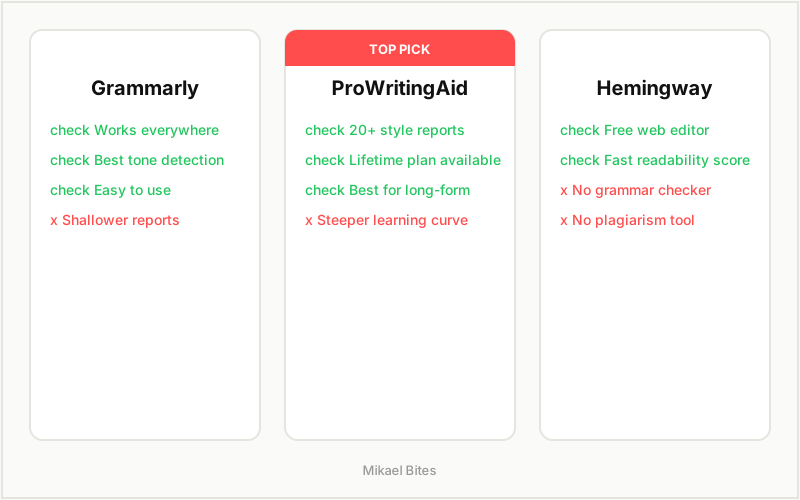
| Grammarly | Works everywhere, best tone detection, easy to use | Shallower style reports, subscription only |
| ProWritingAid | Deepest style reports, one-time lifetime pricing option, strong for long-form | Steeper learning curve, less reliable browser extension |
| Hemingway Editor | Free, fast, one-time desktop app price | No grammar/spelling checker, no plagiarism tool |
Pricing Comparison
| Plan | Grammarly | ProWritingAid | Hemingway Editor |
|---|---|---|---|
| Free tier | Yes (basic grammar checks) | Yes (limited word count per check) | Yes (web editor, full features) |
| Monthly premium | ~$12/month | ~$10/month | N/A |
| Annual premium | ~$8.34/month billed yearly | ~$6/month billed yearly | N/A |
| Lifetime option | Not available | Yes, one-time payment | Desktop app, $19.99 one-time |
This is where the Grammarly vs ProWritingAid vs Hemingway Editor decision gets interesting for budget-conscious writers: ProWritingAid is the only one of the three offering a genuine lifetime plan, which can work out far cheaper than years of Grammarly's subscription if you're planning to use an editing tool long-term. Hemingway's $19.99 desktop app is the cheapest option overall, but it's also the least capable.
If you're writing blog content regularly and want the best long-term value, Try ProWritingAid free → is worth testing before committing to a subscription elsewhere.
Which Is Better for Everyday Writing?
If you're checking emails, social posts, and general web writing throughout the day, Grammarly is the stronger pick. Its browser extension covers more ground than ProWritingAid's, and the tone detector is genuinely useful for anything you're sending to another person. For casual, spread-across-many-apps writing, Grammarly's convenience wins.
Which Is Better for Bloggers and Long-Form Content?
ProWritingAid is the better choice for bloggers and anyone producing long-form content regularly. Its style reports actively teach you to write more concisely and vary your sentence structure, which compounds in value the more you write. Combined with its lifetime pricing option, it's the more cost-effective tool for someone publishing multiple articles a month. I'd pair it with a quick Hemingway pass at the end for a final readability check.
Which Is Better for Beginners on a Budget?
Hemingway Editor is the easiest recommendation for a beginner who doesn't want to commit to a subscription at all. It's free to use in the browser, has no learning curve, and immediately shows you where your writing gets hard to follow. It won't catch every grammar mistake, so pairing it with Grammarly's free tier for spelling and grammar is a reasonable zero-cost combination while you're starting out.
My Verdict: Which Should You Choose?
Choose Grammarly if: You want one tool that works across every app you write in, with the best tone detection available. It's the easiest to recommend for everyday writing and professional communication.
Choose ProWritingAid if: You write long-form content regularly and want the deepest style analysis available, plus a genuine lifetime pricing option that beats a recurring subscription over time. It's the best value for serious bloggers.
Choose Hemingway Editor if: You want a free or cheap, no-frills readability check and don't need grammar checking or plagiarism detection built in.
For most Mikael Bites readers writing blog content and affiliate reviews consistently, I lean toward ProWritingAid as the better long-term investment — the style reports pay for themselves once you internalize the patterns they point out, and the lifetime plan beats paying for Grammarly indefinitely.
FAQs
Is ProWritingAid better than Grammarly? It depends on your use case. ProWritingAid offers deeper style reports and a one-time lifetime pricing option, making it better for long-form writers. Grammarly has broader app integration and better tone detection, making it better for everyday writing across many platforms.
Is Hemingway Editor free? Yes, the web-based version of Hemingway Editor is completely free with no account required. The desktop app, which adds offline access and a publishing feature, is a one-time $19.99 purchase.
Does ProWritingAid have a lifetime plan? Yes. ProWritingAid offers a one-time lifetime payment option that unlocks Premium features permanently, which can be significantly cheaper than Grammarly's ongoing monthly or annual subscription over two or three years.
Can I use Grammarly and Hemingway Editor together? Yes, and many writers do. A common workflow is drafting and checking grammar with Grammarly, then running the finished draft through Hemingway for a final readability pass before publishing.
Which tool catches more grammar mistakes, Grammarly or ProWritingAid? Both catch the vast majority of grammar and spelling errors with similar accuracy. Grammarly tends to flag issues faster in real time as you type, while ProWritingAid is built more for reviewing a completed draft in one pass.
Is Grammarly Premium worth the price for bloggers? Grammarly Premium is worth it if you want one subscription that works across every app you write in, but for bloggers focused specifically on long-form content, ProWritingAid's style reports and lifetime pricing often provide better long-term value.
This article contains affiliate links. I may earn a commission at no extra cost to you.