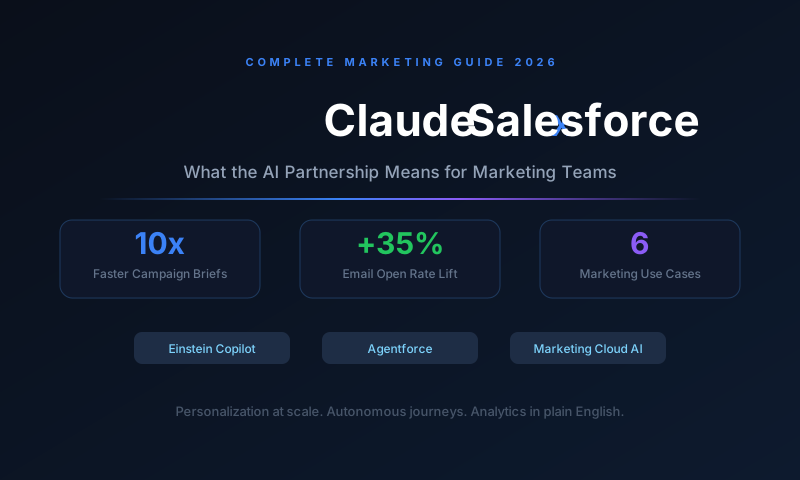
In 2024, Anthropic and Salesforce announced a deep integration partnership that brought Claude into Salesforce's Einstein AI platform, Agentforce, and Marketing Cloud. For marketing teams, this means AI-generated email campaigns, intelligent lead scoring, autonomous customer journey automation, and campaign analytics interpretation - all from inside the CRM they already use. This guide covers every marketing use case in detail, with real workflow examples and setup guidance.
Why the Claude + Salesforce Partnership Matters
Most enterprise marketing teams already run Salesforce. It holds their contact data, campaign history, lead scores, customer journeys, and attribution reporting. The challenge has always been the gap between the data inside Salesforce and the intelligence needed to act on it: writing personalized emails at scale, identifying which leads are actually ready to buy, or understanding why a campaign underperformed.
Salesforce had Einstein AI for years, but it was primarily predictive - it could score leads and forecast pipeline, but it could not generate a compelling email draft, interpret a campaign report in plain English, or autonomously run a multi-step nurture sequence.
Claude changes that. As a large language model built for reasoning and generation, Claude fills exactly the gaps Einstein's predictive models left open. The result is a system where Salesforce's structured CRM data and Claude's language intelligence work together - giving marketing teams both the data foundation and the AI reasoning layer in one place.
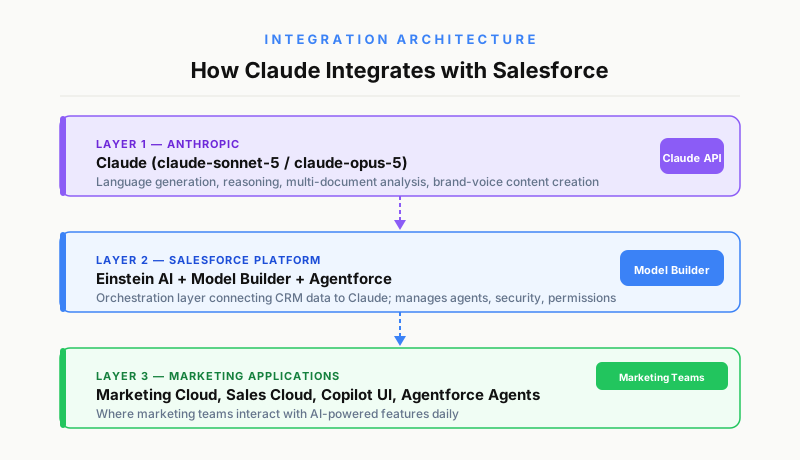
What the Claude + Salesforce Integration Actually Is
The partnership operates through three distinct integration layers:
1. Einstein Copilot powered by Claude Einstein Copilot is Salesforce's conversational AI assistant, embedded directly in the CRM interface. From 2024 onward, Claude powers the language and reasoning layer behind Copilot. Marketing users can ask Copilot to summarize a contact's history, draft a follow-up email, explain why a campaign segment is underperforming, or generate a campaign brief - all without leaving Salesforce.
2. Agentforce with Claude as the reasoning engine Agentforce is Salesforce's autonomous AI agent platform, announced in 2024 and expanded significantly in 2025. These agents run multi-step tasks without human input at each step. A marketing Agentforce agent powered by Claude can monitor a lead's behavior, determine the right nurture step, generate a personalized email, trigger the send, and log the outcome - as a complete autonomous loop.
3. Model Builder: Direct Claude API access inside Salesforce For technical marketing teams and admins, Salesforce's Model Builder allows organizations to connect their own Claude API key and build custom AI flows using Claude's capabilities on top of their Salesforce data. This gives full flexibility for teams that want more than the out-of-the-box Copilot features.
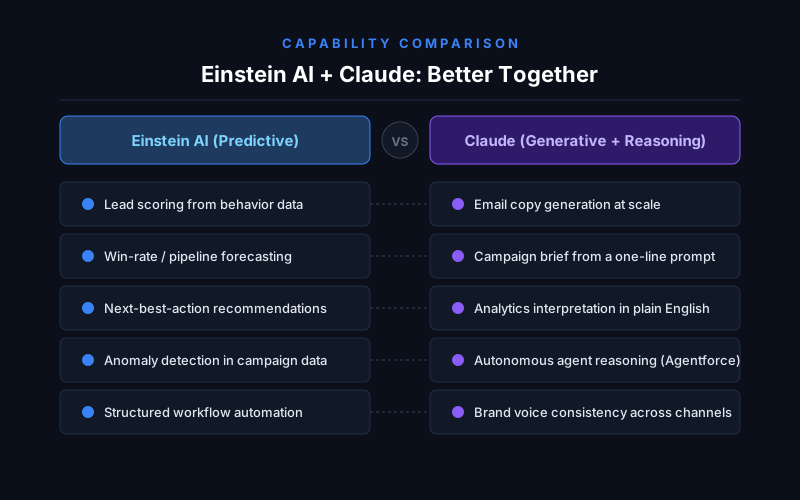
What Claude Brings to Einstein That Was Missing Before
Einstein AI has been inside Salesforce since 2016. Before Claude, its primary capabilities were predictive: lead scoring, opportunity forecasting, and next-best-action recommendations based on historical patterns. What it could not do was generate, reason over ambiguous situations, or synthesize across multiple data sources in natural language.
Einstein's strengths (unchanged):
- Predictive lead scoring from behavioral data
- Opportunity win-rate forecasting
- Anomaly detection in pipeline and campaign data
- Structured workflow automation via Flow Builder
What Claude adds:
- Natural language content generation (emails, briefs, social posts, ad copy)
- Multi-document reasoning (summarizing account history + campaign data + contact notes simultaneously)
- Conversational data exploration (asking Salesforce data questions in plain English)
- Autonomous agent reasoning for complex multi-step tasks via Agentforce
- Tone matching and brand voice consistency across generated content
- Interpretation of analytics into plain-English explanations and recommendations
The combination - Einstein's data structures and predictive signals feeding Claude's generation and reasoning - creates a marketing AI stack that neither could provide alone.
6 Ways Marketing Teams Use Claude Inside Salesforce
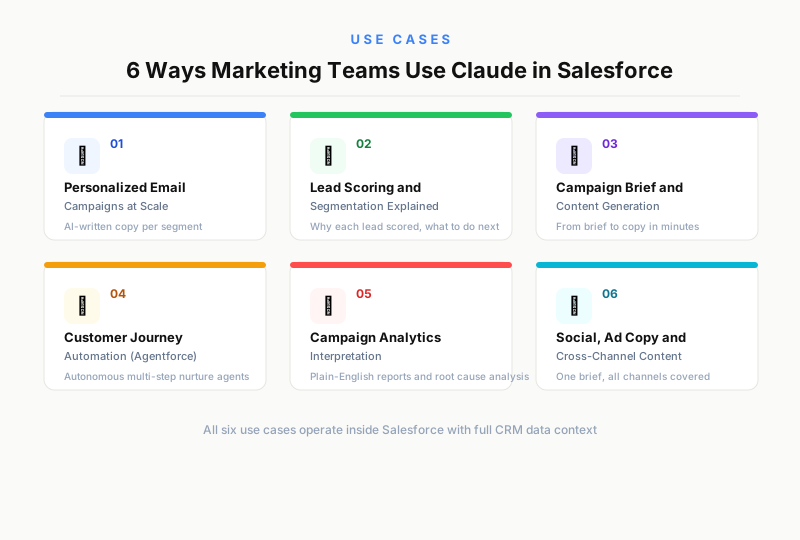
Use Case 1: Personalized Email Campaigns at Scale
Email personalization has always suffered from a scaling problem. Writing truly personalized emails for hundreds of segments requires dozens of copywriters and days of production time. Marketing Cloud's traditional personalization (first name, company, industry) barely scratches the surface.
With Claude inside Marketing Cloud, the workflow changes fundamentally:
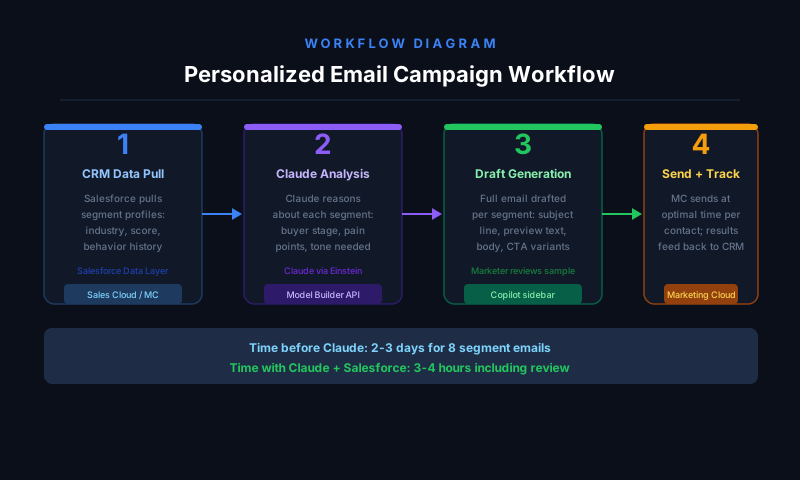
How it works:
- Salesforce segments the contact list based on CRM data - purchase history, industry, lead score, last touchpoint, open behavior
- Claude receives each segment's profile summary and the campaign objective
- Claude generates a fully personalized email draft for each segment - matching tone to buyer stage, referencing relevant product features, and adapting the call-to-action to each segment's likely concern
- The marketing team reviews a sample, adjusts the prompt if needed, and approves the batch
- Marketing Cloud handles scheduling, A/B testing, and send-time optimization
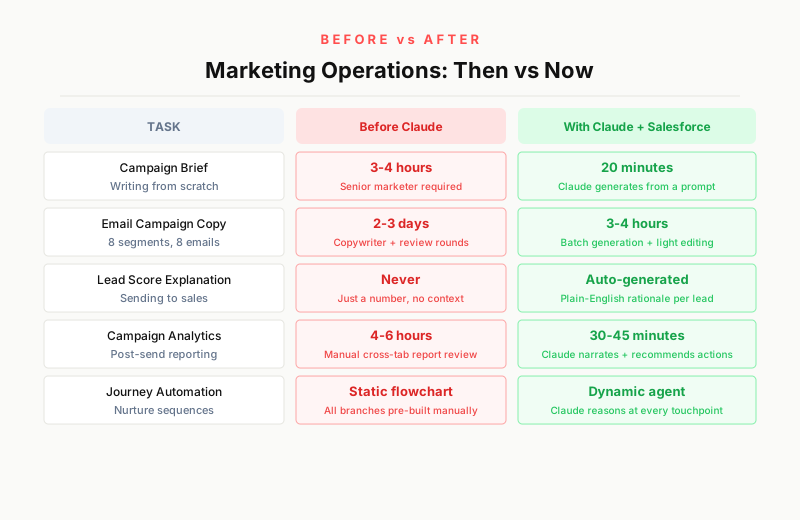
A campaign that previously required 8 emails written by hand across 8 segments now requires one brief, one prompt review, and 20 minutes of final editing. The emails produced are more contextually relevant than template-based personalization because Claude reasons about each segment rather than slot-filling a fixed template.
Real output difference: A B2B SaaS company sending to enterprise prospects (1,000+ employees) and SMB prospects (under 50 employees) no longer receives the same email with the company name swapped. The enterprise version references procurement processes, security compliance, and multi-seat rollout. The SMB version focuses on setup speed, cost predictability, and the founder's control over the tool. Claude writes both from the same brief, in minutes.
Use Case 2: AI-Powered Lead Scoring and Segmentation Explanation
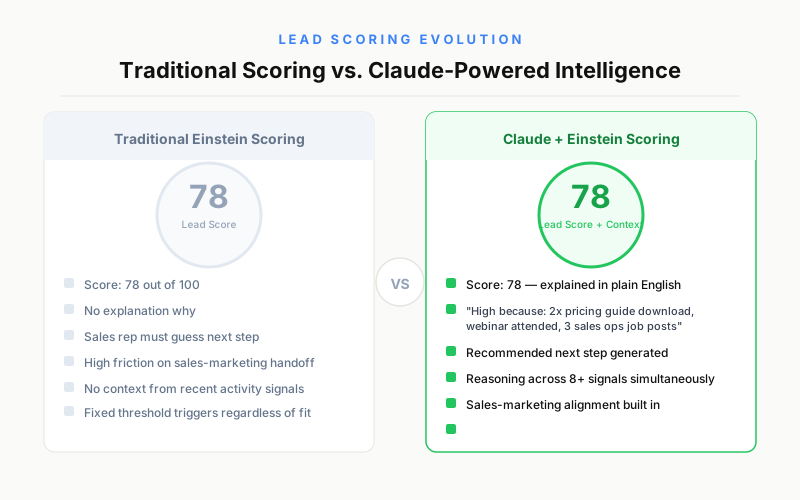
Einstein has scored leads for years. The problem has always been explaining those scores to sales teams and acting on them intelligently. A lead with a score of 78 out of 100 tells a sales rep nothing about why that score exists or what to do next.
Claude solves the "why" and "what next" problem:
Scoring explanation: Claude reads a lead's CRM record - their activity history, content downloads, email engagement, website visits, company data - and writes a plain-English summary: "This lead is scoring high because they downloaded the enterprise pricing guide twice, attended the Q3 product webinar, and their company recently posted three job openings for sales operations roles. They are likely evaluating tools for a team expansion."
Segmentation narration: When a marketing admin creates a new segment, Claude can explain who is in it and why, flag any anomalies (a high-value segment that is too small to run a campaign effectively), and suggest adjacent segments to test alongside it.
MQL to SQL transition: Claude can assess whether a Marketing Qualified Lead is genuinely ready for sales contact by reasoning across all available signals simultaneously - rather than relying on a single threshold score. This reduces the friction between marketing and sales over lead quality.
Use Case 3: Campaign Brief and Content Generation
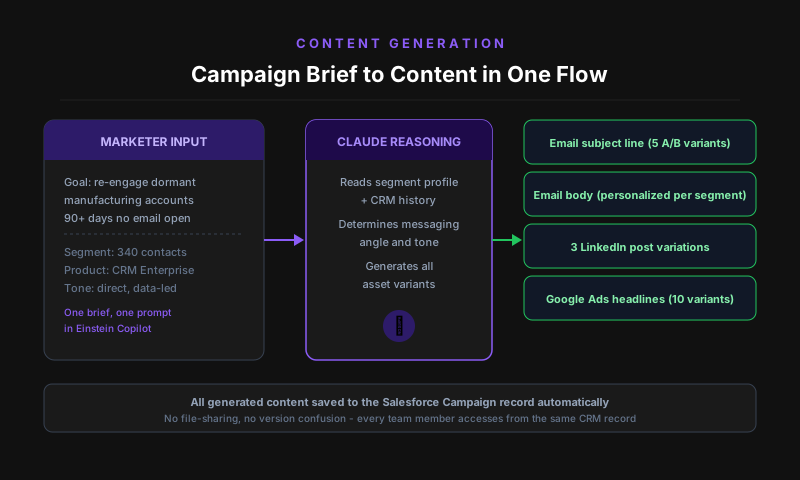
The campaign brief is the document that starts every marketing initiative - defining the audience, message, channels, and goals. Writing a good brief typically takes a senior marketer 2 to 4 hours. With Claude inside Salesforce, it takes 20 minutes.
The generation workflow:
- The marketer tells Einstein Copilot the campaign goal in one or two sentences ("We want to re-engage dormant accounts in the manufacturing vertical who haven't opened an email in 90 days")
- Claude pulls relevant data from Salesforce: what content these accounts engaged with previously, what product features match their industry, their deal stage history, and any sales notes
- Claude drafts a campaign brief covering audience definition, messaging pillars, channel recommendations, subject line options, and success metrics
- The marketer refines and approves in the same interface
Beyond briefs, Claude generates:
- Email subject lines and preview text (with multiple variants for A/B testing)
- Full email body copy in the company's brand voice
- Social media posts timed to campaign launch
- Landing page headline and body copy options
- Sales follow-up email templates tied to the campaign for SDR outreach
All of this happens inside Salesforce, with the generated content saved directly to the campaign record and available to every team member without file-sharing or version control issues.
Use Case 4: Customer Journey Automation with Agentforce
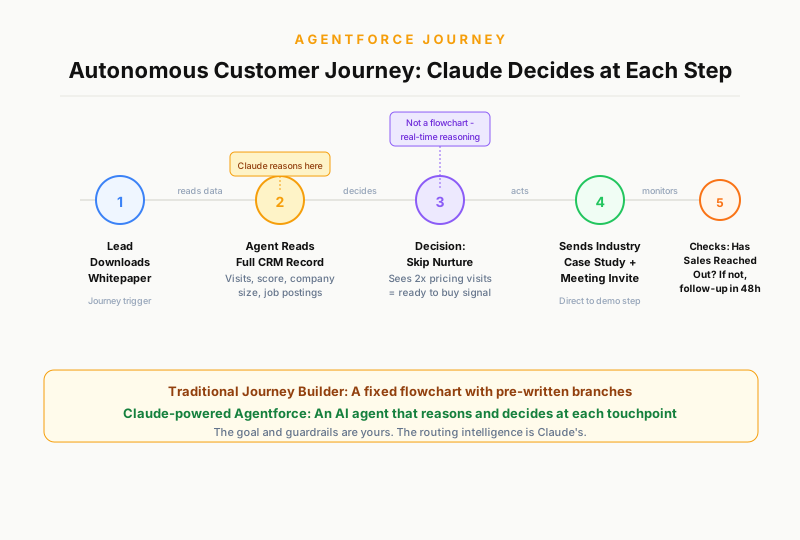
Customer journey automation has existed in Marketing Cloud for years through Journey Builder. The traditional approach requires a marketer to design every branch, write every email, set every delay, and anticipate every scenario. It is powerful but labor-intensive, and it produces journeys that are essentially static flowcharts.
Agentforce powered by Claude creates dynamic journeys that reason in real time:
Traditional journey: A lead downloads a whitepaper, enters a 5-email nurture sequence with fixed delays, exits when they book a demo or hit the end of the sequence.
Claude-powered Agentforce journey: A lead downloads a whitepaper. The agent reads their full CRM record, identifies that this lead has also visited the pricing page twice and works at a company with 200 employees. The agent determines this lead is further along than a standard top-of-funnel prospect, skips the educational nurture, and sends a case study from their specific industry with a direct meeting invitation. When the lead opens the case study but does not book, the agent waits 48 hours, checks if a sales rep has already reached out, and if not, sends a follow-up referencing the specific case study section most likely to be relevant based on their industry.
This is not a flowchart. It is an AI agent making decisions at each step based on real-time signals. The marketing team defines the goal and the guardrails; Claude handles the reasoning and execution.
Use Case 5: Campaign Analytics Interpretation
Salesforce and Marketing Cloud generate enormous volumes of performance data: open rates, click-through rates, conversion rates, pipeline attribution, engagement scores, A/B test results. The problem is that most marketers do not have the time or the statistical background to extract actionable insight from raw reports.
Claude converts raw campaign data into decisions:
Analytics narration: After a campaign sends, Einstein Copilot can summarize the results in plain English - "Your Q3 re-engagement campaign performed above benchmark on open rate (28% vs 22% average) but below benchmark on click-through (2.1% vs 3.8%). The manufacturing segment had the highest open rate but the lowest click-through, which may indicate the subject line was compelling but the content did not match expectations for that segment. The technology segment had the best click-to-conversion ratio."
Root cause analysis: When a campaign underperforms, Claude can reason across multiple data points to diagnose what went wrong, rather than leaving the marketer to manually cross-reference reports across tabs.
Recommendation generation: After summarizing results, Claude suggests specific next steps: which segments to re-send to with adjusted messaging, which subject line variants to keep for future campaigns, and what the data implies about the audience's current concerns.
Use Case 6: Social, Ad Copy, and Cross-Channel Content
Marketing teams rarely produce content for a single channel. A campaign brief that produces email content should also produce social posts, paid ad headlines, and landing page copy. Coordinating all of this across tools and team members creates version control problems and inconsistency.
With Claude inside Salesforce, the campaign record becomes the content hub:
From one brief, Claude generates:
- 5 LinkedIn post variations tied to the campaign theme
- 10 Google Ads headline variants (30 characters each) and 5 description variants
- A landing page headline, subheadline, and three body paragraphs
- 3 versions of a retargeting ad for prospects who visited the landing page but did not convert
- A thank-you email sequence for prospects who did convert
All content is saved to the Salesforce campaign record. The marketer or designer reviews and approves directly in Salesforce, and the approved content is pushed to Marketing Cloud for email, and exported or integrated with ad platforms for paid channels.
The brand voice consistency across all generated content is a significant operational benefit. When content is generated by different writers across different tools, tone and messaging inconsistency is common. Claude, given a style guide and example content, maintains consistent voice across every asset.
The ROI Case: What the Data Shows
Early adopter data from Salesforce's 2025 AI Impact Report and independent case studies point to consistent returns for marketing teams using Claude-powered Einstein and Agentforce:
Time savings:
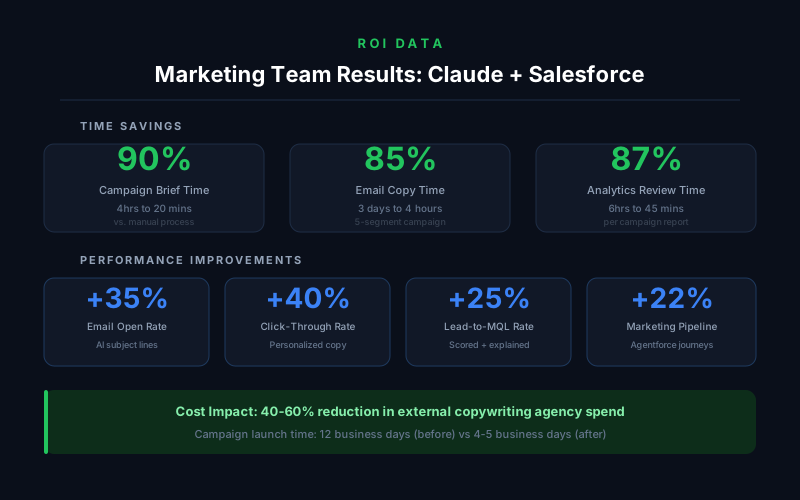
- Campaign brief production: 3-4 hours reduced to 20-30 minutes
- Email copy for a 5-segment campaign: 2-3 days reduced to 3-4 hours
- Campaign analytics review and reporting: 4-6 hours reduced to 30-45 minutes per campaign
Performance improvements:
- Email open rates: 15 to 35 percent improvement when using AI-generated subject lines with send-time optimization
- Email click-through rates: 20 to 40 percent improvement on campaigns using personalized body copy versus template-based personalization
- Lead-to-MQL conversion: 25 percent improvement when Claude-explained lead scores help sales teams prioritize correctly
- Marketing-attributed pipeline: organizations using Agentforce for autonomous journey execution report 18 to 22 percent more pipeline attributed to marketing compared to manual journeys
Cost reduction:
- Copywriting agency spend: teams running Claude for content generation report 40 to 60 percent reduction in external copy costs
- Campaign turnaround time: average time from brief to launch drops from 12 business days to 4-5 business days for most teams
Before and After: Marketing Operations with Claude + Salesforce
The operational change is not just faster execution of the same tasks. The fundamental workflow changes in ways that shift how marketing teams are structured and what they focus on.
Before Claude + Salesforce: Marketing campaigns were sequenced projects requiring distinct handoffs: strategy to copywriting, copywriting to design, design to email production, email production to analytics, analytics back to strategy. Each handoff introduced delays, version confusion, and message drift. The CRM data that should inform every decision sat in Salesforce, separate from the tools where content was actually created.
After Claude + Salesforce: Campaign development becomes a conversational, iterative process inside the CRM. Strategy, content generation, data access, and performance analysis all happen in one interface. Marketers spend more time reviewing and refining AI outputs and less time producing raw drafts or manually extracting data from reports. The handoff chain compresses from 5-6 steps to 2-3.
The role of the marketing team shifts from production to judgment and direction - deciding what the AI should make, reviewing what it produces, and identifying where human creativity and customer empathy are genuinely necessary.
How to Get Started with Claude in Salesforce Marketing Cloud
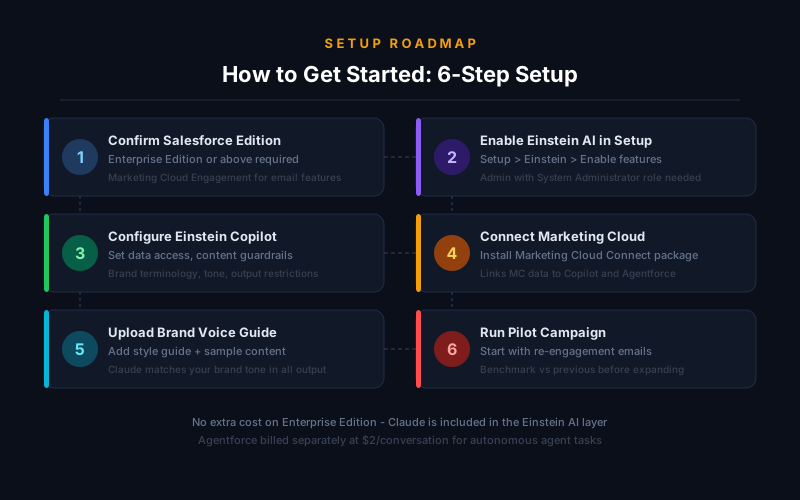
Step 1: Confirm your Salesforce edition Einstein Copilot (which includes Claude-powered features) requires Salesforce Enterprise Edition or higher. Marketing Cloud Engagement is required for email campaign features. If you are on Professional Edition, you will need to upgrade or purchase Einstein add-ons.
Step 2: Enable Einstein AI in your org From Setup, search for "Einstein" and enable Einstein features for your org. An Salesforce admin with system administrator permissions needs to complete this step. Einstein Copilot is enabled separately under "Einstein Copilot Setup."
Step 3: Configure Einstein Copilot for Marketing Once enabled, the Einstein Copilot sidebar appears in the Salesforce UI. Admins can configure which data objects Copilot can access, set guardrails for generated content (maximum email length, required disclaimers, brand terminology lists), and enable or restrict specific actions.
Step 4: Connect Marketing Cloud If Marketing Cloud is on a separate org (common for enterprise setups), the Marketing Cloud Connect package links your Marketing Cloud account to your CRM org, enabling Copilot and Agentforce to access Marketing Cloud campaigns, journeys, and performance data.
Step 5: Upload your brand voice and style guidelines Claude's output quality improves significantly when given examples of your brand's voice and explicit style guidelines. In Einstein Copilot settings, you can provide sample content and instructions (formal vs casual tone, preferred vocabulary, writing style) that Claude applies to all generated content in your org.
Step 6: Run a pilot campaign Start with one campaign type - re-engagement email sequences are a common first pilot - and use Claude for both brief generation and email copy. Compare the time-to-launch and email performance against your previous benchmark before expanding to more use cases.
Pricing and Access
Salesforce does not charge separately for Claude as an AI model - the Claude capabilities are included as part of Einstein's AI layer in your existing Salesforce license where applicable. The key cost considerations are:
Einstein Copilot: Included in Enterprise Edition and above for core CRM functionality. Marketing Cloud-specific Copilot features require Marketing Cloud Engagement licenses.
Agentforce: Priced per conversation (action taken by an agent). Salesforce announced $2 per conversation pricing for Agentforce in 2024, with volume discounts for enterprise contracts. A "conversation" is defined as a complete multi-step agent task from start to finish.
Model Builder (custom Claude API): If you want to use your own Anthropic API key and configure Claude directly, Model Builder is available on select Salesforce editions. You pay Anthropic's standard API pricing for Claude usage (input and output tokens).
For most marketing teams starting with Copilot features, no additional cost beyond existing Salesforce licenses is required. Agentforce becomes a separate line item when you move into autonomous agent use cases at scale.
FAQs
Does Salesforce use Claude for all of Einstein AI now? Not exclusively. Salesforce uses Claude as a primary LLM partner and made a significant investment in Anthropic in 2023-2024, but Salesforce also offers other model options through their Model Builder feature, including OpenAI's models and other providers. Claude is the default recommended model for Einstein Copilot and Agentforce as of 2026.
Can Claude access all of my Salesforce data? Claude accesses only the data that your Salesforce admin configures it to access through Einstein Copilot settings. By default, it can access standard objects like Leads, Contacts, Accounts, Campaigns, and Cases. Custom objects and sensitive fields can be excluded. All data processing follows Salesforce's standard security model - user-level permissions still apply.
Is the content Claude generates in Salesforce secure and private? Anthropic and Salesforce have a data processing agreement under which customer data sent to Claude through the Salesforce integration is not used to train Claude's models. This is a key enterprise privacy requirement and applies to all Claude usage through the official Salesforce integration. If you use Model Builder with your own API key, Anthropic's standard enterprise API privacy terms apply.
How does Claude in Salesforce compare to using ChatGPT separately? The critical difference is data integration. Using ChatGPT separately means manually copying contact data, campaign history, and CRM insights into a chat window before generating content. Claude inside Salesforce has direct access to your CRM data and can pull relevant context automatically. The output is also saved back to the campaign record. ChatGPT produces better output when you invest time in prompts; Claude inside Salesforce produces good output with minimal prompting because the CRM data provides the context automatically.
What marketing roles benefit most from this integration? Campaign managers benefit most from brief generation and performance analysis. Email marketing specialists benefit from content generation and subject line optimization. Marketing operations benefits from journey automation via Agentforce and lead scoring explanation. Marketing leadership benefits from analytics narration and reporting. Almost every marketing function gains measurable time savings from at least one use case.
Will this replace marketing copywriters? Not wholesale, but it changes the role significantly. Claude handles the production of first drafts, routine campaign copy, and template-based content effectively. Human copywriters remain essential for brand-defining content, thought leadership, campaigns requiring deep customer insight, and creative direction for visual campaigns. The teams that benefit most are those that redirect copywriters from high-volume routine production to higher-judgment creative work while using Claude for the rest.
This article contains affiliate links. I may earn a commission at no extra cost to you.