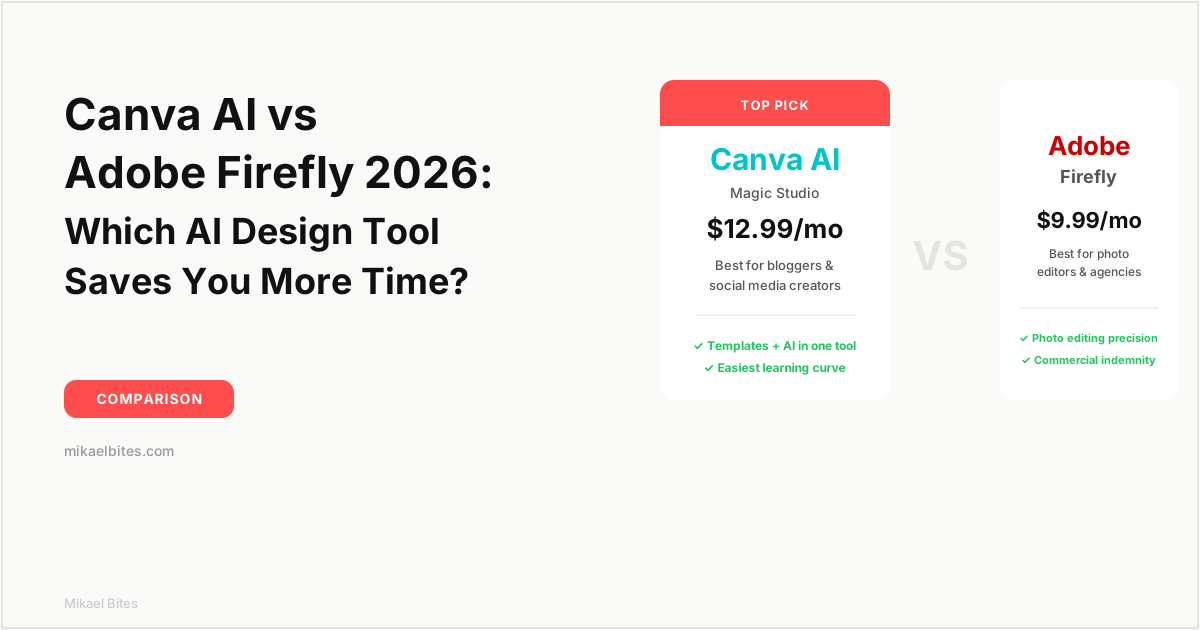
In the Canva AI vs Adobe Firefly comparison, Canva wins for bloggers, marketers, and small business owners who need fast social graphics, blog images, and presentations inside one all-in-one editor. Adobe Firefly wins for photographers and designers who need precise generative editing inside Photoshop and want commercially safe, indemnified output. If you're not already paying for Creative Cloud, Canva is the cheaper, faster starting point.
Quick Comparison Table
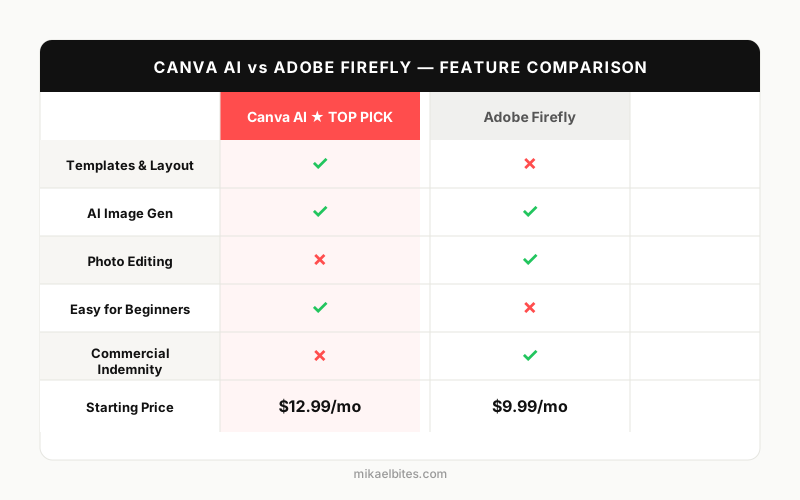
| Feature | Canva AI (Magic Studio) | Adobe Firefly |
|---|---|---|
| Starting price | Free, Pro from $12.99/month | Free, Standard from $9.99/month |
| Core AI toolset | Magic Design, Magic Write, Magic Media, Magic Eraser, Magic Expand | Generative Fill, Generative Expand, Text to Image, Generative Remove |
| Template library | Hundreds of thousands, ready to edit | Minimal - not a template-first tool |
| App ecosystem | Standalone all-in-one design suite | Photoshop, Illustrator, Premiere, Express |
| Commercial-use protection | Standard license, no indemnification | Adobe indemnifies Firefly-generated content on paid plans |
| Team collaboration | Strong, built for teams out of the box | Depends on Creative Cloud Libraries setup |
| Learning curve | Very easy, drag-and-drop | Moderate, steeper inside Photoshop |
| Best for | Bloggers, social media, presentations, non-designers | Photo editors, agencies already in Adobe's ecosystem |
Overview: Canva AI (Magic Studio)
Canva built its name as a drag-and-drop design tool for people who don't know how to use Photoshop, and Magic Studio - its bundle of AI features - extends that same philosophy to AI. Magic Write drafts captions and headlines, Magic Media generates images and short video clips from a text prompt, Magic Eraser removes unwanted objects from a photo, and Magic Expand extends an image beyond its original borders to fit a new aspect ratio. All of it lives inside the same editor you already use to build a Instagram post or a slide deck.
What makes Canva AI different from a dedicated image generator isn't raw output quality - it's context. You're not generating an image and then importing it somewhere else to make it usable. You type a prompt, Magic Media drops the result directly onto your canvas, and you're immediately resizing, adding text, and dropping it into a template that's already sized for Pinterest, LinkedIn, or a blog header. For someone producing daily social content or blog graphics, that's a real time save over jumping between a generator and a separate design tool.
The tradeoff is image quality. Magic Media's outputs are solid for illustrations, backgrounds, and stylized graphics, but they don't match the photorealism or artistic polish you get from Midjourney or Adobe Firefly's newer models. If you want dedicated image-generation quality rather than a design suite with AI bolted on, my Midjourney vs DALL-E 3 vs Stable Diffusion comparison covers the tools built specifically for that job.
Try Canva Pro free for 30 days →
Overview: Adobe Firefly
Adobe Firefly is Adobe's generative AI model, and it's built around a specific promise: everything it generates is trained on licensed content - Adobe Stock, public domain material, and content Adobe has rights to - which means the output comes with commercial-use indemnification on paid plans. If a client or platform ever questions the copyright status of an image you generated with Firefly, Adobe stands behind it. That single feature is the reason a lot of agencies and enterprise teams default to Firefly over Midjourney or DALL-E, regardless of which produces prettier images.
The feature that actually changed how I edit photos is Generative Fill inside Photoshop. Select a region of an existing image, describe what you want there instead, and Firefly fills it in while matching lighting, perspective, and texture from the rest of the photo. Removing a person from a background, extending a photo's canvas for a new crop, or swapping out a product in a mockup - all of that used to take real Photoshop skill. Generative Fill collapses it into a text prompt.
Used as a standalone web app, Firefly also does straight text-to-image generation, but this is where it shows its limits. Compared to Midjourney or even Canva's newer model options inside Magic Media, plain Firefly-generated images tend to look a little flatter and less stylistically ambitious. Firefly isn't trying to be the best pure image generator - it's trying to be the safest and most controllable one to plug into a professional editing workflow.
I tested Generative Fill on a handful of product photos with distracting backgrounds - a coffee mug shot with a cluttered desk behind it, a headshot with someone's arm creeping into frame. In both cases, Firefly rebuilt the background convincingly enough that I couldn't spot the seam without zooming in. That's a different level of usefulness than a text-to-image generator producing something from scratch - it's editing a real photo you already have, which is what most small business product listings and blog images actually need.
Features Head-to-Head
Image generation. Canva's Magic Media is faster to get from prompt to a usable, on-brand asset because it's generating directly inside a template-driven canvas. Firefly's text-to-image output is more consistent in following detailed prompts and staying photorealistic, but you're generating in a more isolated environment before pulling the result into another app.
Generative editing. This isn't close - Firefly's Generative Fill and Generative Expand, especially inside Photoshop, are more precise than anything Canva offers. Canva's Magic Eraser and Magic Expand handle simple cases well (removing a logo, extending a background color), but they struggle with complex scenes where Firefly's Photoshop integration handles lighting and perspective correctly.
Templates and layout. Canva's template library is enormous and covers nearly every format a blogger or marketer needs - Instagram carousels, YouTube thumbnails, resumes, pitch decks, printable planners. Firefly doesn't compete here at all; it's not trying to be a layout tool, and Adobe Express (a separate, lighter product) is Adobe's actual answer to Canva's template-first approach.
Brand consistency. Canva's Brand Kit lets you lock in fonts, colors, and logos so every AI-generated design pulls from the same visual identity automatically. Firefly has a comparable feature - Custom Models, which trains on your own brand assets - but it's only available on higher-tier Firefly plans and requires more setup than Canva's out-of-the-box Brand Kit.
Video. Both tools now generate short AI video clips from text prompts, but neither is a serious alternative to a dedicated video generator. If short-form AI video is your priority, that's a different comparison than this one.
Ease of onboarding. A new Canva user can open the editor, pick a template, and publish something usable within ten minutes, no tutorial required. Firefly's standalone web app is nearly as simple for basic text-to-image work, but its most valuable feature lives inside Photoshop, and Photoshop itself has a real learning curve. If your team doesn't already know Photoshop, you're paying for that ramp-up time before Firefly's editing tools start saving you anything.
Commercial usage rights. Canva's standard license covers most everyday use, but it doesn't offer the indemnification Adobe provides. Firefly's paid plans include Adobe's legal backing for generated content, which matters more the bigger and more visible your usage gets - think ad campaigns and client work, not blog headers.
Pricing Comparison
Canva's free plan already includes limited access to Magic Write, Magic Eraser, and a capped number of Magic Media generations per month, which is enough to test the waters. Canva Pro runs $12.99/month for one person (cheaper if billed annually), and unlocks unlimited Magic Media generations, the Brand Kit, background remover, and premium templates. Canva Teams adds shared brand controls and folders for a small per-seat markup, which is the plan most small businesses actually land on once more than one person is designing.
Adobe Firefly has its own free tier with a monthly generative credit allowance, enough for casual experimentation but not for daily content production. Firefly Standard starts at $9.99/month and includes a set number of generative credits each month; Firefly Pro moves to $29.99/month for a much larger credit pool plus access to Firefly's video generation features. If you already pay for a Creative Cloud plan like Photography or All Apps, Firefly credits are bundled in, which is the more common way professional users actually access it.
Dollar for dollar, Canva Pro gives you more usable output for the price if your work is mostly graphics, templates, and social content. Firefly's pricing only starts to make sense once you're either inside the Adobe ecosystem already or specifically need the indemnification and Photoshop-level editing precision.
Pros and Cons
Canva AI (Magic Studio)
| Pros | Cons |
|---|---|
| Huge template library covers nearly every content format | Image generation quality trails dedicated AI image tools |
| AI features work inside the same editor as your final design | Generative editing is basic compared to Photoshop |
| Cheaper for solo creators and small teams | No commercial-use indemnification |
Adobe Firefly
| Pros | Cons |
|---|---|
| Best-in-class generative editing inside Photoshop | Not a design/template tool - needs another app for layout |
| Commercial-use indemnification on paid plans | Standalone image generation looks flatter than competitors |
| Deep integration across the whole Adobe ecosystem | Steeper learning curve, especially inside Photoshop |
Which Is Better for Bloggers and Small Businesses?
If you're running a blog, a small e-commerce store, or a social media presence and you're not a trained designer, Canva is the more practical choice by a wide margin. You need finished graphics fast - a blog header, a Pinterest pin, a carousel for Instagram - and Canva gets you from blank canvas to publish-ready asset without leaving one tab. The AI features are useful, but they're not the main event; the templates and layout tools are what actually save you time day to day.
Adobe Firefly earns its keep in a narrower but important use case: photo editing that needs to look seamless. If you're removing a distracting object from a product photo, extending a background for a different crop, or swapping elements in a mockup, Firefly inside Photoshop does that better than anything Canva offers. It's the right tool when the deliverable is a photograph, not a templated graphic.
My Verdict: Which Should You Choose?
Buy it: Canva Pro, if you're a blogger, marketer, or small business owner who needs to produce a steady stream of social graphics, blog images, and presentations without hiring a designer. At $12.99/month, it pays for itself the first week you use it.
Buy it: Adobe Firefly, if you're already working inside Photoshop or Creative Cloud and need generative editing precision or commercial indemnification for client work. Skip the standalone Firefly web app if template-driven design is really what you're after - that's Canva's job, not Firefly's.
Try Canva Pro free for 30 days →
FAQs
Is Canva AI as good as Adobe Firefly? For templated design work - social graphics, presentations, blog images - Canva AI is the more practical tool. For generative photo editing like removing or replacing objects in an existing image, Adobe Firefly is more precise, especially inside Photoshop.
Does Adobe Firefly cost extra on top of Photoshop? Firefly's generative credits are bundled into most Creative Cloud plans, but heavy users can run out of monthly credits and need to buy more or upgrade to Firefly Pro.
Can I use Canva AI images for commercial purposes? Yes, Canva's standard license covers commercial use for most content, but it doesn't include the legal indemnification that Adobe provides for Firefly-generated content on paid plans.
Which tool is better for someone with no design experience? Canva, without question. Its templates, drag-and-drop editor, and Magic Studio AI tools are built for people who've never used a professional design app.
Do I need Photoshop to use Adobe Firefly? No, Firefly has a standalone web app for text-to-image generation, but its most powerful feature - Generative Fill - is built for use inside Photoshop, so you lose most of the value without it.
This article contains affiliate links. I may earn a commission at no extra cost to you.