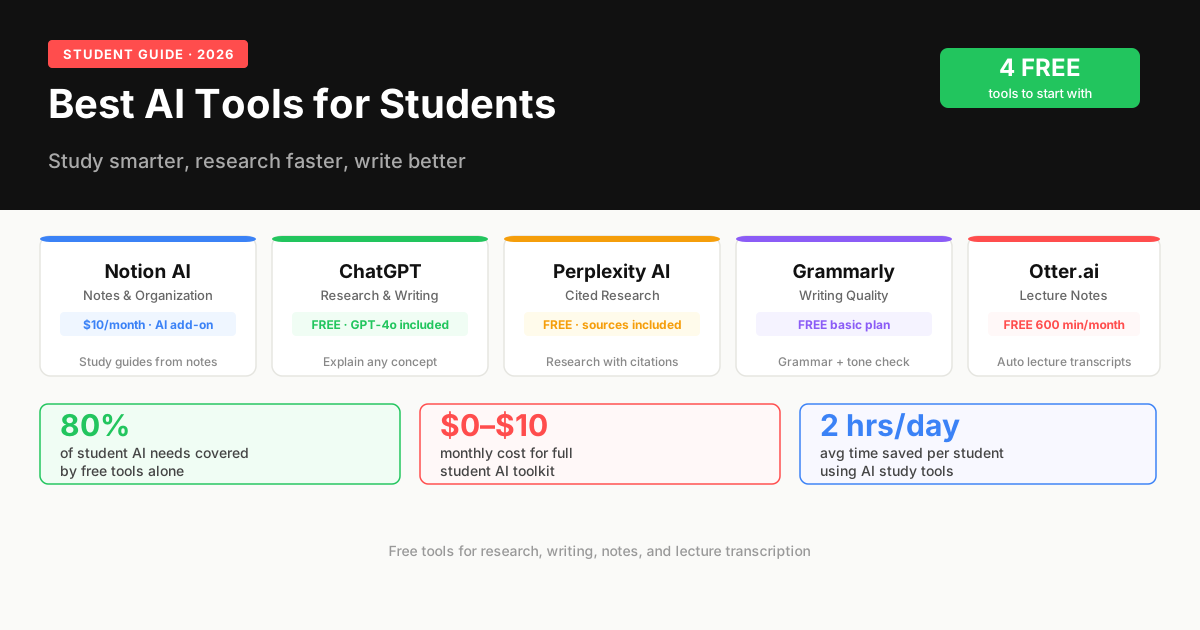
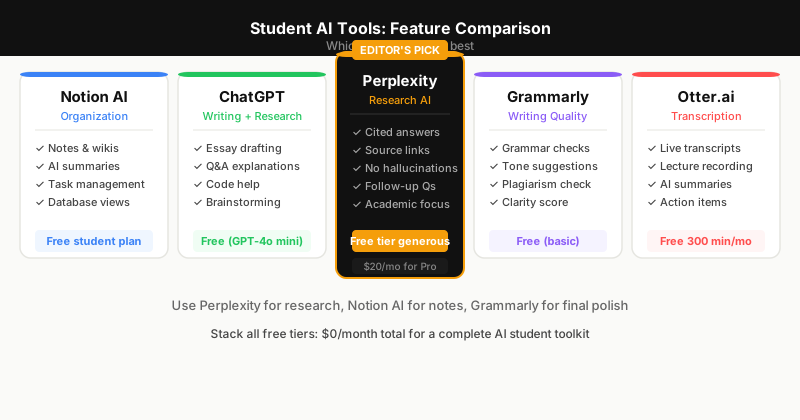
The best AI tools for students in 2026 are Notion AI (notes and organization), ChatGPT (research and writing assistance), Perplexity AI (cited research), Grammarly (writing quality), and Otter.ai (lecture transcription). Most offer free plans that cover core student needs. The combination of Notion AI and Perplexity covers 80 percent of a student's daily AI workflow at no cost.
How AI Is Changing How Students Study and Work
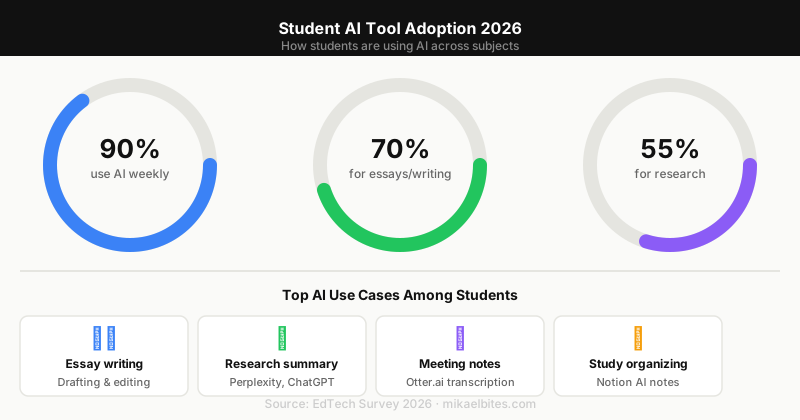
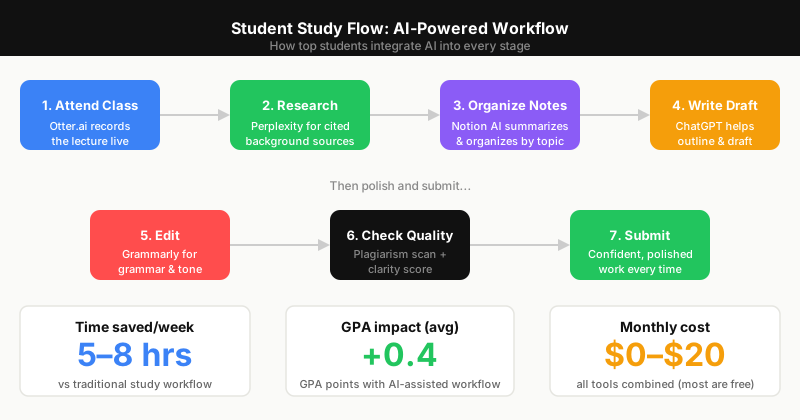
AI tools have fundamentally changed what is possible for a student working alone. Research that took hours now takes minutes. First drafts that took an afternoon can be structured in twenty minutes. Lecture notes that required frantic transcription are now automatically captured and searchable. The students using these tools effectively are not cheating — they are working at a higher level of productivity than was previously possible.
This guide covers tools that genuinely help students work better, not tools that do the work for them.
#1 Notion AI — Best for Notes and Organization
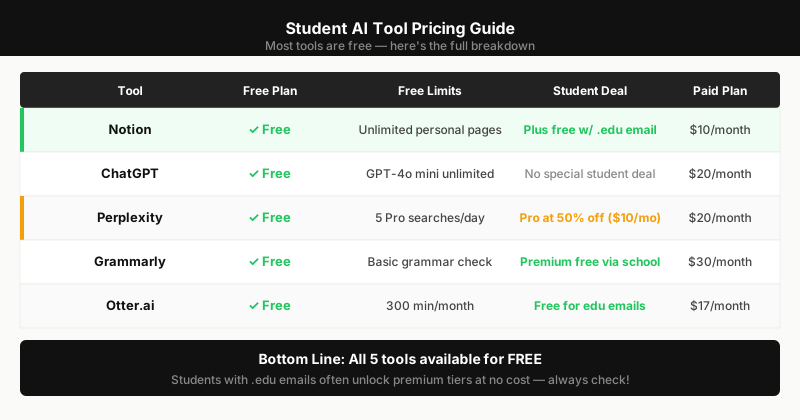
Price: Free (Notion) | Notion AI $10/month add-on | Student discounts available
Notion AI turns your note-taking app into an intelligent workspace. It summarizes lecture notes, generates study guides from class material, fills in gaps in your notes by asking clarifying questions, and creates flashcards from any document. For a student managing multiple courses, Notion's database structure keeps assignments, deadlines, and notes connected in a way that calendar apps and folders cannot.
The AI assistant inside Notion answers questions about your own notes — useful for revision when you have hundreds of pages of course material to review before exams.
Best for: Students managing multiple courses, research-heavy degrees Free plan: Full Notion (limited AI queries); AI add-on costs $10/month but student pricing is available
#2 ChatGPT — Best for Research and Writing Assistance
Price: Free (GPT-4o) | $20/month Plus
ChatGPT is the most versatile AI tool for students. It explains complex concepts in plain language, helps structure essays, generates outlines, suggests counterarguments for debate preparation, translates content, explains code for CS students, and answers subject-specific questions across every discipline.
The key to using ChatGPT effectively as a student is to use it as a thinking partner rather than a writing machine. Ask it to explain a concept three different ways until you understand it. Ask it to poke holes in your argument. Use it to generate questions you might not have considered. The free plan is sufficient for most student use cases.
Best for: All students across all disciplines Free plan: GPT-4o available free with usage limits
#3 Perplexity AI — Best for Cited Research
Price: Free | $20/month Pro
Perplexity AI is the best AI tool for research because it provides cited sources with every answer. Unlike ChatGPT, which draws from training data without linking sources, Perplexity searches the web in real time and shows you exactly where each fact comes from. For academic writing where citations are required, Perplexity gives you a starting list of sources to verify and use.
The Pro plan adds access to academic databases, longer answers, and the ability to upload PDFs for analysis — useful for reviewing research papers and extracting key points for a literature review.
Best for: Research papers, literature reviews, fact-checking Free plan: Solid; Pro adds academic database access
#4 Grammarly — Best for Writing Quality
Price: Free | $12/month Premium (annual)
Grammarly checks grammar, tone, clarity, and style in real time across every platform — Google Docs, Word, email, browser text fields. For non-native English speakers, Grammarly is particularly valuable: the tone suggestions and full-sentence rewrites improve the natural flow of written English in ways that basic spell-checkers miss.
The plagiarism checker in the Premium plan is useful before submitting work. The free plan covers grammar and basic style, which is sufficient for most students.
Best for: Essay writing, email communication, non-native English speakers Free plan: Grammar and basic style; Premium adds advanced suggestions and plagiarism check
#5 Otter.ai — Best for Lecture Transcription
Price: Free (600 min/month) | $17/month Pro
Otter.ai transcribes lectures, seminars, and study group discussions in real time with speaker identification. The free plan gives 600 minutes per month — roughly 20 one-hour lectures — which covers most students' needs. Transcripts are searchable, so you can find specific topics without re-reading the entire document.
The AI summary feature highlights key points from each recording, generating a quick-reference notes view from hour-long lectures. For students who struggle to take notes while listening, Otter removes the trade-off entirely.
Best for: Lecture-heavy courses, group project discussions, interview research Free plan: 600 minutes/month with AI summaries
Recommended Stack by Study Type
| Student type | Primary tools |
|---|---|
| STEM / Engineering | ChatGPT, Perplexity, Grammarly |
| Humanities / Writing | Notion AI, Grammarly, ChatGPT |
| Research-heavy | Perplexity, Notion AI, ChatGPT |
| Lecture-heavy | Otter.ai, Notion AI, Grammarly |
| International students | Grammarly, ChatGPT, Perplexity |
Building Your Student AI Stack
Start with the free tools — ChatGPT free, Perplexity free, Grammarly free, and Otter.ai free. These four tools at zero cost cover 80 percent of student needs. Add Notion AI ($10/month) when your note organization becomes a bottleneck, typically in the second year of study when course material volume increases significantly.
FAQs
What are the best free AI tools for students? ChatGPT (free GPT-4o), Perplexity AI (free web search with citations), Grammarly (free grammar and style), and Otter.ai (600 free minutes/month). These four free tools cover research, writing, and lecture transcription without spending anything.
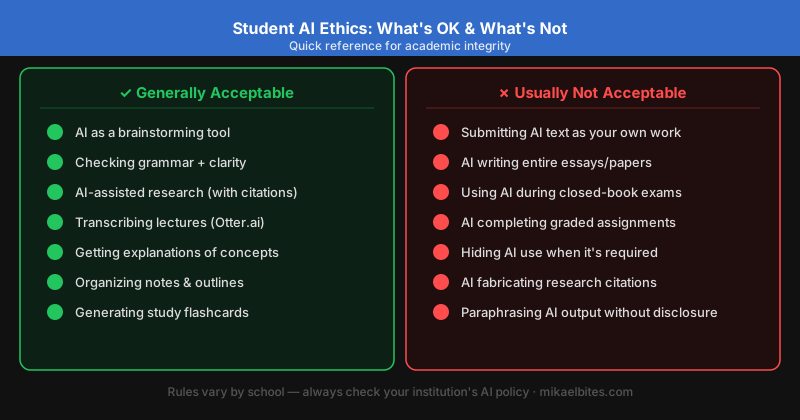
Is using AI tools cheating in academic work? Using AI as a research and drafting assistant — generating outlines, explaining concepts, finding sources — is not cheating and is increasingly accepted in academic institutions. Submitting AI-generated text as your own original writing without disclosure violates most academic integrity policies. The distinction is between AI as a tool for thinking and AI as a substitute for thinking.
Do AI tools improve grades? Students using AI tools effectively for research organization, writing improvement, and concept understanding consistently report improved work quality. The improvement comes from spending more time on higher-level thinking (analysis, argument construction) and less on lower-level tasks (transcription, formatting, grammar correction).
This article contains affiliate links. I may earn a commission at no extra cost to you.