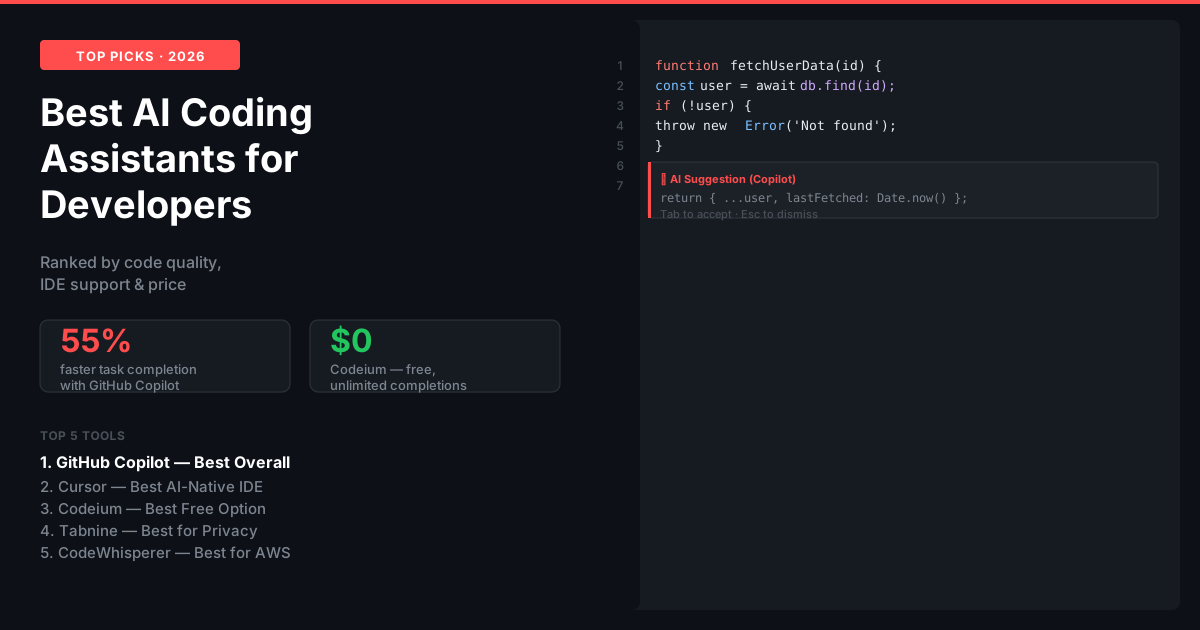
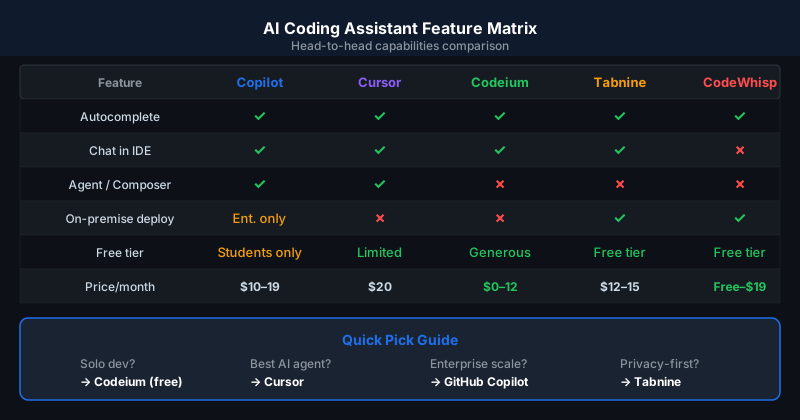
The best AI coding assistant for most developers in 2026 is GitHub Copilot at $10 per month — it has the broadest IDE support, the most mature codebase understanding, and the best integration with GitHub workflows. Cursor is the best for developers who want a full AI-native IDE experience. Codeium is the best free option. Claude in coding workflows is the best for complex reasoning about architecture and debugging.
How AI Coding Assistants Have Evolved in 2026
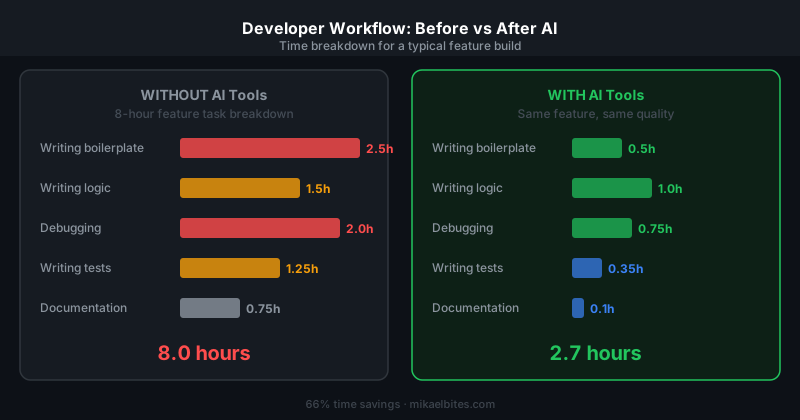
AI coding assistants have moved beyond autocomplete. The best tools in 2026 understand your entire codebase, explain unfamiliar code, generate full functions from comments, write and run tests, and debug errors with context from the surrounding code. For most developers, AI coding tools have become as fundamental as a linter.
#1 GitHub Copilot — Best Overall
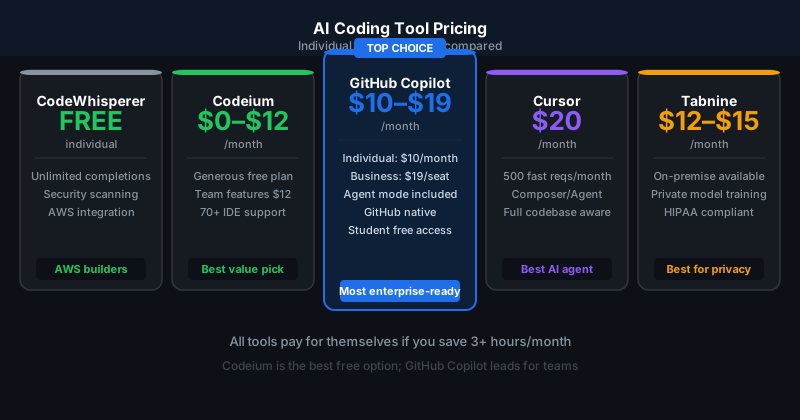
Price: Free (limited) | $10/month Individual | $19/month Business
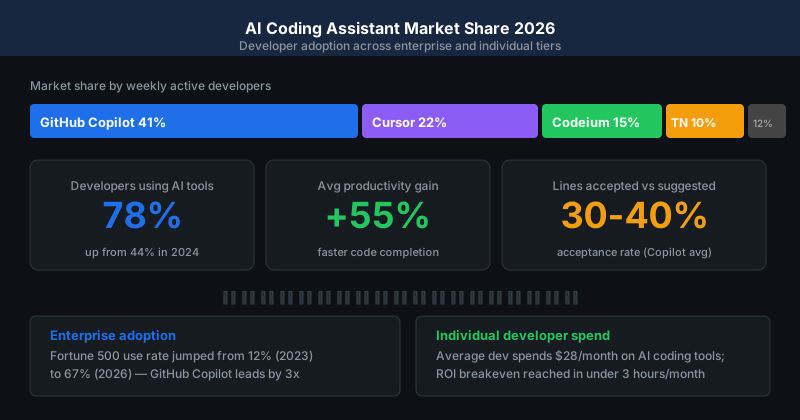
GitHub Copilot is the most widely used AI coding assistant in 2026. Trained on billions of lines of public code, it provides inline code completions, a chat interface for asking coding questions, and multi-file context understanding that lets it suggest changes across related files.
Copilot's agent mode can autonomously implement features, write tests, and fix bugs across a codebase with minimal prompting. The GitHub integration — pull request summaries, code review suggestions, and commit message generation — makes it the most complete developer workflow tool.
The free plan covers 2,000 completions per month and 50 chat messages, sufficient for light use. Most developers on active projects will hit the limits and need the $10 per month Individual plan.
Best for: All developers, especially GitHub users IDE support: VS Code, Visual Studio, JetBrains, Neovim, Eclipse
#2 Cursor — Best AI-Native IDE
Price: Free (2-week Pro trial) | $20/month Pro
Cursor is a VS Code fork built specifically for AI-assisted development. The entire IDE is designed around AI — every feature, from tab completion to multi-file edits, is optimized for AI interaction. The Composer feature lets you describe a change in natural language and Cursor implements it across multiple files simultaneously.
For developers comfortable moving from VS Code, Cursor provides a significantly more integrated AI experience than adding Copilot to a standard IDE. The context window for understanding the codebase is larger than Copilot's, which improves performance on complex multi-file changes.
Best for: Full-stack developers, developers building complex features IDE support: Cursor only (VS Code-compatible extensions work)
#3 Codeium — Best Free Option
Price: Free (individual) | $12/month Teams
Codeium is the strongest free AI coding assistant in 2026. The free tier has no completion limits, supports 70-plus languages, and integrates with all major IDEs. Completion quality is competitive with Copilot's free tier on standard tasks.
For students, hobbyist developers, and early-stage startups that want AI assistance without a subscription, Codeium is the clear choice. The enterprise-grade features (remote context, custom fine-tuning) require the Teams or Enterprise plan.
Best for: Students, hobbyists, developers evaluating AI tools before committing to a paid plan IDE support: VS Code, JetBrains, Neovim, Vim, Emacs, and 40+ more
#4 Tabnine — Best for Privacy-Conscious Teams
Price: Free (basic) | $12/month Pro | $39/month Enterprise
Tabnine's key differentiator is privacy: it can run entirely on-premise or in a private cloud, meaning your code never leaves your infrastructure. For companies with strict IP protection policies or regulated industries (finance, healthcare, government), Tabnine is often the only acceptable AI coding tool.
The AI model can be trained on your company's own codebase, learning your internal patterns, naming conventions, and architecture preferences over time. Code suggestion quality improves the longer it trains on your codebase.
Best for: Enterprise teams, regulated industries, teams with IP sensitivity IDE support: VS Code, JetBrains, Eclipse, Visual Studio, Neovim
#5 Amazon CodeWhisperer — Best for AWS Developers
Price: Free (individual) | $19/month Professional
Amazon CodeWhisperer is free for individual developers and is the natural choice for teams building on AWS. It understands AWS APIs, services, and best practices deeply — for Lambda functions, DynamoDB schemas, S3 configurations, and CDK stacks, CodeWhisperer's suggestions are more accurate than general-purpose tools.
The security scanning feature (included free) detects vulnerabilities in generated code and suggests fixes, which is a meaningful differentiator for security-conscious teams.
Best for: AWS developers, cloud engineers, teams already using AWS IDE support: VS Code, JetBrains, Visual Studio, AWS Cloud9
Comparison Table
| Tool | Best for | Free tier | Paid from |
|---|---|---|---|
| GitHub Copilot | General use + GitHub | 2,000 completions | $10/month |
| Cursor | AI-native IDE experience | 2-week trial | $20/month |
| Codeium | Free unlimited use | Unlimited | $12/month (Teams) |
| Tabnine | Privacy, on-premise | Basic | $12/month |
| CodeWhisperer | AWS development | Unlimited (individual) | $19/month |
Which AI Coding Assistant Should You Start With?
Start with GitHub Copilot's free tier or Codeium (fully free) to get used to AI-assisted development without a subscription commitment. Once AI completions are part of your daily workflow, upgrade to the paid tier that matches your primary IDE and use case. Most developers settle on one primary tool within two to four weeks of daily use.
FAQs
What is the best AI coding assistant in 2026? GitHub Copilot for most developers. Cursor for those who want an AI-native IDE. Codeium for free unlimited use. Tabnine for teams with strict privacy or IP requirements.
Does AI coding assistants replace developers? No — AI coding assistants accelerate development, they do not replace the architectural judgment, debugging intuition, and product thinking that experienced developers provide. Developers using AI tools ship faster and handle more complexity; they are more valuable, not more replaceable.
Is GitHub Copilot worth the $10 per month? For any developer coding more than 10 hours per week professionally, yes. Studies show 30 to 55 percent faster task completion with Copilot. At $10 per month, the productivity gain pays for itself in the first hour of saved time in most professional contexts.
This article contains affiliate links. I may earn a commission at no extra cost to you.